

What are the best Minecraft mods in 2025? Every game of vanilla Minecraft can vary quite dramatically, and the best Minecraft mods go one step further to provide an entirely new experience. Whether you love creative building, terrifying survival, or speed-running the story, we’ve got the mods for you. We’ve even thrown in interface mods and tools to make things easier, too.
We’ve trawled through them and all the best Minecraft mods are listed below, including the best horror Minecraft mods, performance mods, and more, depending on what you want to do with the sandbox game. There are new mobs, new biomes, performance-boosting mods, and more, and you can jump to the bottom if you don’t know how to install Minecraft mods and want to learn.
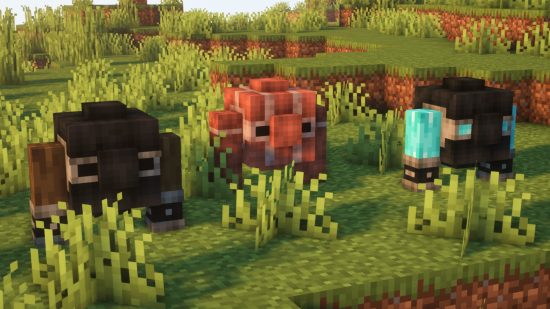
The best Minecraft mods available right now are:

Optifine
Make Minecraft look incredible with Optifine, perhaps the most essential Minecraft mod. Optifine adds support for HD textures and more control over graphical options. You’ll likely need Optifine installed before you can run Minecraft shaders, but even on its own, it provides dynamic lighting, improved textures, and a performance boost.
Optifine should be fine on most PC setups, but if you’re playing on a potato, grab Fastcraft instead – it significantly improves performance on lower-end machines, particularly with lots of Minecraft mods installed.

Fisk’s Superheroes
Fisk’s Superheroes isn’t just a skin pack – you might get the added bonus of looking like a super cool hero, but with great style comes great power… or something. Each suit gets its own special powers, from super-speed, slight, energy beams, and more.
Plus, if you’ve ever wanted to explore the wilderness in the comfort of an ultra-modern, bleeding-edge, and rather famous suit, then the Iron Maniac Heropack is the Fisk add-on for you. This texture pack adds Tony Stark’s iconic suits to your game, including Mark I-V and even the original War Machine armor, as long as you’ve got Fisk’s installed as well. The wildlife had better watch out.
Mouse Tweaks
When you’re an expert Minecraft player, you should know all the tricks of the trade to get the job done as fast as possible. With the Mouse Tweaks mod, you can add a whole new set of shortcuts to your arsenal with a revamped right-click dragging mechanic, new left-click dragging tricks, and tweaks to the scroll wheel.

Botania
If you’re mad about magic and nature, then don’t sleep on the Botania Minecraft mod. Using the power of the earth, you can grow new mystical flowers and magical devices that can be used for automation. In comparison to other automation mods like Immersive Engineering, Botania is more natural, so if you prefer dirt to metal, this is the engineering mod for you.

Parasites
More than a Minecraft mod, Parasites from Forge Labs feels like an entirely separate horror-survival game. Dropped into a post-apocalyptic world filled with new monstrous mobs, Parasites challenges you with surviving the overworld with limited resources as you scavenge and fight. Not only does the survival gameplay play out brilliantly, but this mod looks fantastic too, from its new monsters to its terrifying biomes.

Aquaculture 2
If you love a bit of peaceful fishing in Minecraft, but are tired of pulling up the same salmon and cod, then give Aquaculture 2 a try. This Minecraft mod adds over 30 new fish, the ability to fish while swimming, new fishing rods, bobbins, and bait. There’s also an incredible new treasure loot table for fishing, which includes the mod’s own Neptunium tools and armor.
Dungeons Enhanced
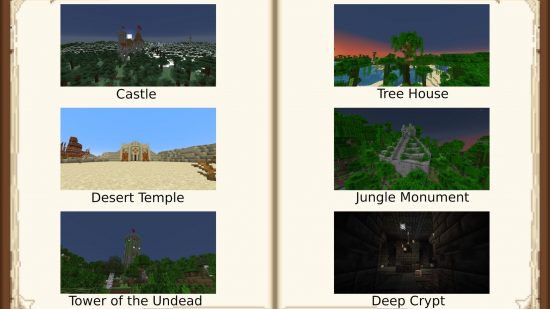
Minecraft has always been fairly limited in terms of the structures or dungeons you can happen upon in the open-world game. It stands to reason, then, that this could get repetitive. Enter the Dungeons Enhanced mod. This mod adds new dungeons and structures, increasing the total types to 21, and they all fit a medieval or fantasy theme. You’ll soon be stumbling upon huge mazes, castles, or even a pyramid.

Nature’s Compass
As we explain in our Minecraft cheats guide, you can search for biomes and structures using in-game cheats. However, this requires creative mode or ruining your survival experience. If you want something a bit more immersive, then Nature’s Compass and its sister mod Explorer’s Compass have you covered.
The Nature’s Compass is a new item, as is the Explorer’s Compass, and can be used to find any biome you’re after. Use the compass to bring up a list of biomes, select the one you want, and follow your compass. Shift-right-click to reset to compass to world spawn, or choose a new biome to change its direction. It’s as simple as that, and feels a little less like cheating. The Explorer’s Compass works in the same way, leading you to structures instead of biomes.

Ars Nouveau
The massive magical Ars Nouveau mod brings an incredible array of new features to Minecraft, allowing you to perform rituals to invoke weather patterns, craft your own spells to aid your survival, and even summon magical mobs to use in automation.
Cave Dweller
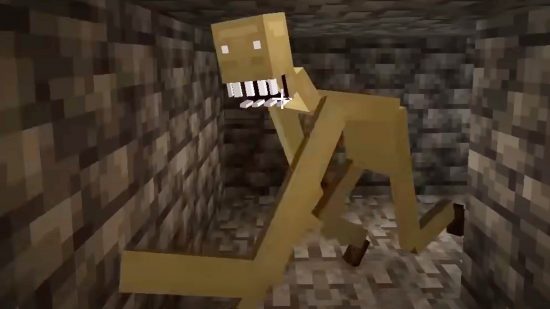
Do you think the Minecraft Warden is scary? Well, it’s the least of your underground problems with this terrifying mod enabled. The Cave Dweller mod introduces the dark entity that follows you around as you explore the adventure game’s caves. While the Cave Dweller can’t sneak up on you, the spooky noises it makes grow louder as it approaches you, so you won’t be caught out completely unaware.
Gargin’s Cave Dweller mod is so popular that other modders have been adding to it, making it even more terrifying. If you somehow want even more scares, give Cave Dweller Evolved or Better Cave Dweller a try.

Tinkers’ Construct
That, up there, that’s a floating Slime island. Just one of the cool features of the Tinkers’ Construct mod. In Tinkers’ Construct, one of the best tool mods around, slime is an essential resource. There’s new slime, there are slime islands, and you can use them all to create smelteries and manufacture a range of new items, tools, and gear. There’s even slimy plantlife.
Decocraft
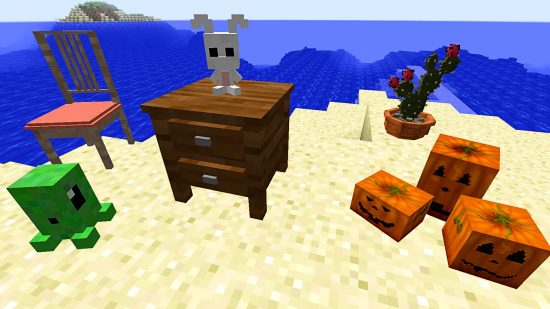
If you’d like a bit more variety when it comes to decorating your Minecraft house, Decocraft is the Minecraft building mod for you. It adds around 3,000 new customization items, including craftable chairs, tables, bowls, bottles, lamps, stuffed toys, beer kegs, and even a kitchen sink. To keep up to date with all those items, and any new additions, you can join the mod’s official Discord.

Better F3
This one’s simple, but oh, so helpful. As you might expect, Better F3 doesn’t change gameplay, but it changes the incredibly useful F3 interface. If you have trouble parsing the information when it’s all the same color (we certainly do), Better F3 adds colored sections. This allows you to better differentiate between all those details and find exactly the information you’re looking for.

Quark
Most Minecraft mods on this list tell you what they do from the title. Quark just tells you how incredibly customizable and modular it is. Named after the subatomic particle (of course), Quark is a huge modpack with a variety of features that can each be turned on and off at your will. But what does it do?
Well, what do you want it to do? Vertical slabs? Check. New building blocks? Check. Automated animal feeding? Check. Better parity with Bedrock edition? Also check. New tools? New mobs? New biomes? Check, check, and check. Just download it and find out.
RLCraft
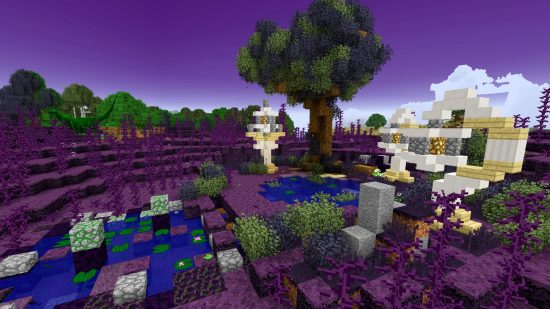
Still the most popular Minecraft mod of all time, RLCraft plays into the world’s love of fantasy with dragons, fairies, and more added to your Minecraft world. But that’s not all. In addition to the range of terrifying and adorable new mobs, RLCraft features new biomes, new auto-generated structures like towers and dungeons, and an all-new survival experience.
Twilight Forest
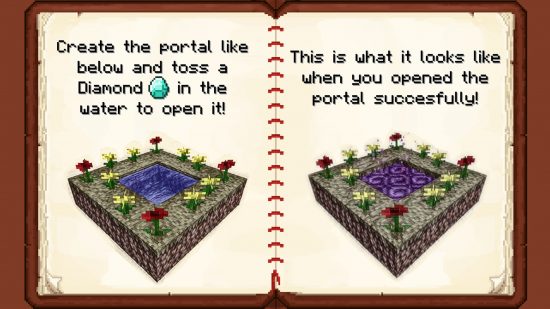
This gorgeous mod adds a new portal and an entirely new dimension: the Twilight Forest. You’ll need to play as normal until you’ve gathered the materials to build the portal above, but then you can completely overhaul your Minecraft experience with new dungeons, mythical creatures, and so much more.

FNAF Management Wanted
Over ten years on, the popularity of FNAF never wavers. With the newest game Secret of the Mimic here, Springtrap appearing as a DBD killer, and the second movie set for release later in 2025, the series is more in demand than ever. So why not combine one favorite with another, and bring the world of FNAF into Minecraft?
With the awesome Management Wanted mod, you can take on a new Five Nights adventure in the overworld, with an RPG angle inspired by FNAF World. Explore familiar locations and battle animatronics in your Minecraft world, and then build and manage your own pizzeria in a fashion similar to FNAF Pizzeria Simulator.
Biomes O’Plenty
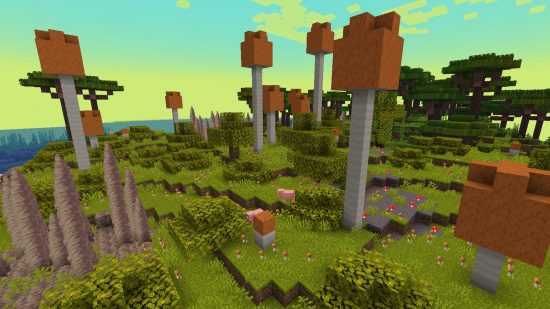
If there aren’t enough vanilla Minecraft Biomes to keep you busy, Biomes O’Plenty adds masses of new areas across both the Overworld and the Nether – from the Alps to Wasteland and everything in between. It adds a little more variety to tools, armor, food, and color while also adding a few extra blocks to build with.

Chisel
The original Chisel mod has undergone lots of redos and remakes over the years, and so there are a variety of mods to try that do similar things. With the likelihood that you’re playing a modern version of Minecraft being high, we recommend Chisel Reborn, which runs up to Minecraft 1.21.7. However, do note that this Chisel only offers a range of new aesthetic blocks, and none of the mechanical options.
Like the original, the Chisel Reborn mod gives you access to a chisel recipe. The tool in turn allows you to change the texture of any block. With a vast range of industrial-style textures, Chisel allows players to build the most complex and intricate builds.
Nyf’s Spiders
Adding this mod gives us the heeby jeebies, but we can’t deny it’s a good mod, and has its place for people a little less arachnophobic than us. The Nyf’s Spiders mod changes the behavior of Minecraft’s eight-legged creatures to make them more realistic. They can walls and ceilings in a more realistic manner than in the vanilla game, and they’re pathing has been improved to make them less… janky. Which also means they can reach you more easily. Eek.

Peaceful Progression
The jump between creative and survival mode can be daunting, and while you do have access to peaceful difficulty, some elements aren’t available in this setting. With xen_42’s Peaceful Progression mod, you gain access to several items that require specific hostile mobs without needing to harm anything in the process. It also adds hunger to peaceful difficulty, but the effects are purely cosmetic and will not cause you to lose any health if you can’t eat anything.

The Silence
The Silence introduces a new mob to the game, the terrifying black-and-white humanoid creature that lurks in the dark. You’ll likely spot it in the distance, with its bright-white face glowing through the dark. The key here is to remain silent to avoid their attack – get too close or make too much noise, and you might not make it out alive.
From the Fog
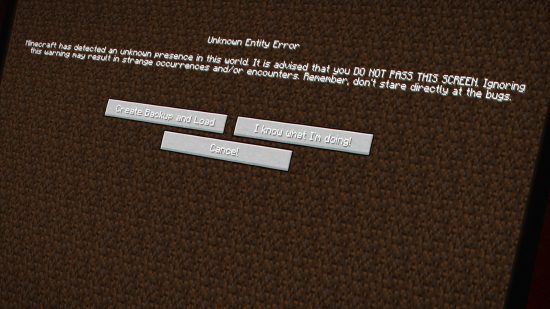
Do you ever wish the Herobrine myth were real? In case you’re aware, this myth is about a creepy NPC that stalks you as you roam the world at night, with its bright white eyes peering out at you from behind trees. From the Fog is a terrifying Minecraft mod that brings Herobrine to life alongside zombie Herobrine and sculk Herobrine cos, you know, Herobrine alone isn’t frightening enough.

Weeping Angels
Inspired by the iconic enemies from Doctor Who, this Weeping Angels mod introduces a new hostile mob. These mysterious angel statues that appear in the world are a sight to behold. The second you turn your back on one of these pretty figures, they come to life and attack. Rather than dealing damage, these stone creatures will teleport you around the map, potentially sending you to a different dimension. Luckily, creator Suff99 has your best interests at heart, so this mod is entirely customizable. If you’re happy to be teleported but don’t want to get stuck in another dimension, you can change the effects.
MCA Reborn
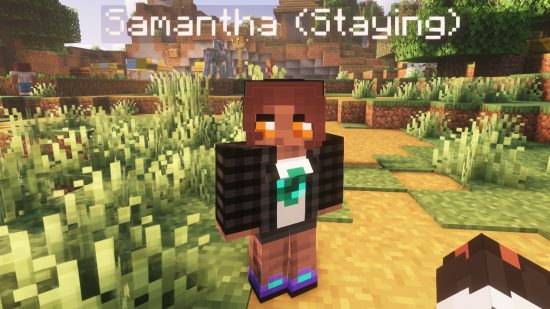
Have you ever wanted a Minecraft dating sim? Well, allow us to introduce you to the Minecraft Comes Alive Reborn mod. You could combine this mod with others you’re interested in, as MCA Reborn focuses only on villages – and the people living within them. Replacing the identical villagers of old, MCA Reborn introduces you to uniquely named villagers, like Samantha above, but the changes don’t stop at appearance. As you interact with these new villagers, you build a relationship with them, ask them to follow you, carry out tasks for you, and even, once you’ve nurtured that relationship enough, ask them to marry you.
Expanding on the original Minecraft Comes Alive, MCA Reborn takes inspiration from the likes of The Sims, giving your villagers moods and personalities that define your relationships with them. They also don’t make that classic villager honk anymore, so you don’t have to worry about their moaning and groaning, leaving you filing for divorce.
Natural Progression
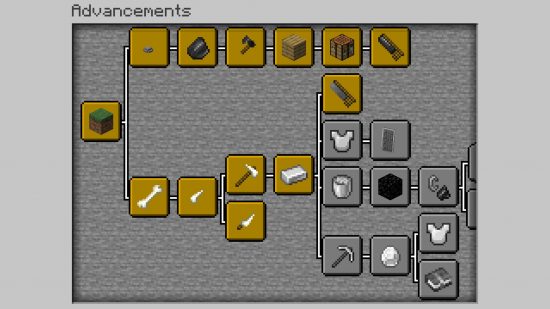
Natural Progression is the ideal mod for those who want a new Minecraft challenge, sticking to the vanilla theme of the game but with a more realistic twist. Instead of punching trees for wood at the start of the game, the Natural Progression mod introduces more materials to discover and craft with to make the early hours of your survival more true to life. Find pebbles or bones to craft your first weapons, and only then can you gather wood to craft a full crafting table and continue your adventure, making the first night or two more challenging than ever.
SkyFactory 4
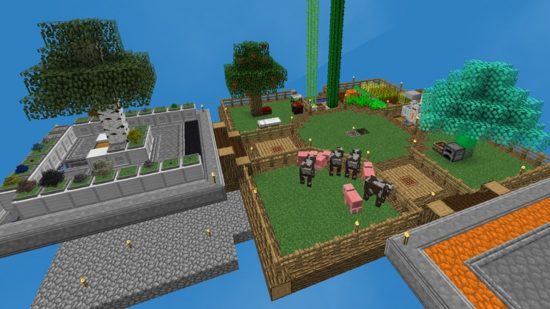
SkyFactory is one of the most classic Minecraft mods based on the popular SkyBlock map. Combining the original SkyBlock experience with industrial autonomy, SkyFactory 4 lets you loose on a floating Minecraft world full of unique devices, machines, new crops, and even magic.

TrulyRandom
TrulyRandom by BawNorton is the best Minecraft randomizer we’ve seen to date. What sets TrulyRandom apart is the fact that you can customize what aspects of the base game are randomized. Structures can be randomized, leaving Nether Fortresses and End cities spawning in the overworld. Crafting recipes can be randomized, meaning you might not be able to make, say, oak planks until you find diamonds – if you’re unlucky. Even villager trades can be randomized, but the most confusing by far is random model textures. You can toggle any of these on and off, though we probably wouldn’t recommend turning them all on at once unless it’s just to see the chaos that unfolds.

Lucky Block
There are a few Lucky Block mods now, but each does pretty much the same thing. You can get the original Lucky Block in the Marketplace for Bedrock edition, but Java players should try oSzoukaua’s Lucky Blocks or Classic Lucky Blocks for a similar experience. With hundreds of outcomes when a Lucky Block is broken, you never know what’s going to happen – and it’s not always good. Will you get an epic new item or a terrifying mob spawning in front of you?
Presence Footsteps
Mojang is making a concerted effort to improve the overall atmosphere of vanilla Minecraft right now. The 1.21.5 update is set to bring falling leaves, desert sound effects, and pretty firefly bushes along with wildflowers and leaf litter. What they haven’t yet added, though, are crunchy footsteps as you walk through those leaves or step on the desert’s dead bushes.
That’s where Presence Footsteps comes in. This mod, based on and maintaining an earlier mod by Huricaaan, doesn’t only add satisfying underfoot sound effects but also includes creaky chests and bubbling magma. A perfect addition to the base game.

Better Archeology
This awesome mod adds an incredible amount of content to the Minecraft archeology mechanic. Not only are there a bunch of new, full fossils to discover, but there are even entirely new structures to scope out. The Temple of Light and the Catacombs add that Indy or Lara Croft element to Minecraft and task you with uncovering the secrets and hidden items hidden within the walls of these spooky areas.
The archeology table, which you can see above, is required to unlock the secrets of unknown artifacts. Brush away the dirt and you can find a unique new enchantment, including tunneling, which allows you to dig two blocks at a time. There’s so much more to find in Better Archeology, so we recommend you just dig in.

BetterEnd
We’re still hoping for a Minecraft End update sometime, but in lieu of an official update, there’s the BetterEnd mod from BetterX, which overhauls the End into a spectacularly beautiful world with an incredible 24 biomes, new mobs, and stunning new flora. The End is an entire game within a game with this mod, and you’ll lose hours exploring the glittering new environment.
TerraFirmaCraft
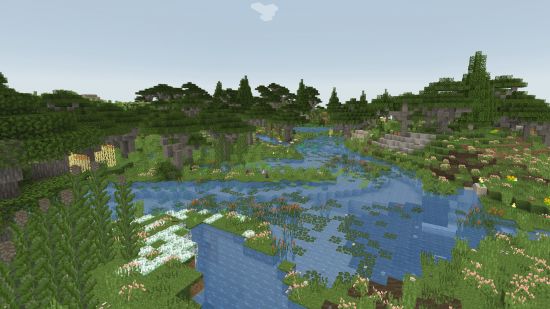
Like RLCraft below, TerraFirmaCraft is a massive world overhaul, creating an entirely new survival experience within Minecraft. Overground, you’ll be greeted by gorgeous new flora, flowing rivers, and all-new structures, while the underground has also been replaced with more realistic layers of rock. You must stay alive during harsh and changing seasons, all while completing a technology tree containing a range of different machines and mechanics than you can find in vanilla Minecraft.
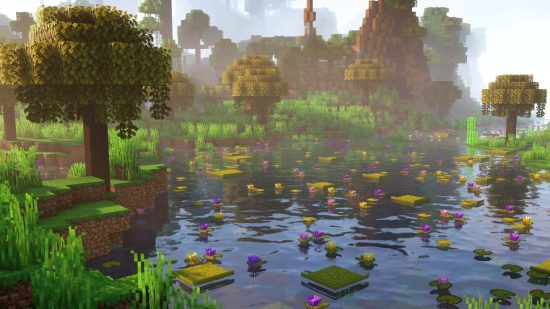
Good Ending
Good Ending by modders Orcinus and Ninni overhauls the Minecraft wilderness, making the survival game even more beautiful than it already is. If you were one of the players disappointed when fireflies were scrapped from the Wild Update, then Good Ending is for you. Modders have implemented the popular mechanic instead, meaning both the daytime and nighttime atmospheres are incredible in this stunning mod.
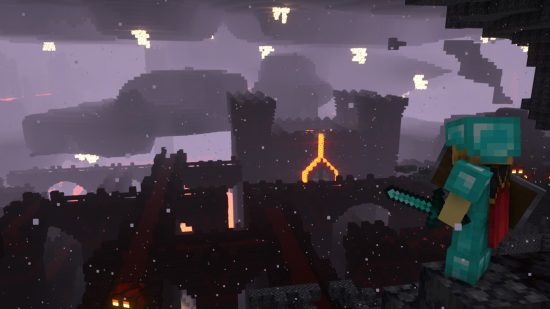
Better Fortresses
Yung’s Better Fortresses is only the tip of Yung’s mod’s iceberg, as the prolific Minecraft modder has also created Better Witch Huts, Ocean Monuments, and almost any other Minecraft structure you can think of. Put them all together, and you’ll have the most incredible Minecraft world imaginable.
For now, though, we’re focusing on our personal favorite, Yung’s Better Fortresses. As you can see from the image above, this Minecraft mod transforms the terrifying Nether by greatly extending its existing Fortresses into even bigger, more magnificent structures, spanning multiple floors and featuring castle-like main buildings. In vanilla Minecraft, these fortresses might be wide, but they don’t really extend up and down. Yung’s better fortresses, on the other hand, include Lava Halls, a part of the structure that delves deep underground.

Better Mineshafts
Okay, technically this is another of YUNG’s many structure mods like the one above, but we feel mineshafts deserves its own applause. These huge underground structures are already pretty decent in vanilla Minecraft: great loot, mob spawners, easy-to-access diamonds – it’s all there. So why not make mineshafts even better.
With this mod, mineshafts now vary to match their biomes, and a rare mushroom biome can even be found if you explore enough. There are also new places to find valuable loot. On top of the usual minecart chests, find materials at workstations and in cellars. Finally, the one thing that desperately need improvement on vanilla mineshafts is dead end tunnels. When we find ourselves at a dead end, it’s just a disappointment. With Yung’s Better Mineshafts mod, there’s a chance to find an ore deposit hidden away here. If you’re lucky, you may even find diamonds.
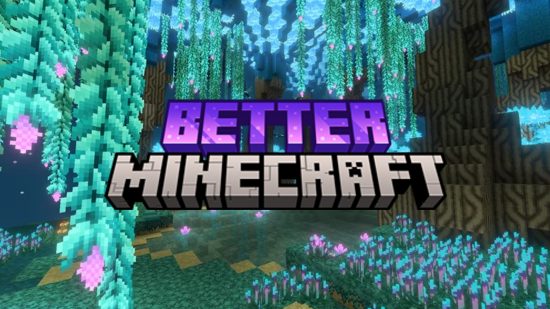
Better MC
The maker’s vision of what Minecraft should have been, Better MC adds multiple bosses, mobs, crops, items, dimensions, quests, and more to give you the comprehensive Minecraft experience you never knew you needed. We’re not saying we don’t still love the base game, but Minecraft will never be the same again once you’ve tried Better MC.

Distant Horizons
A good average render distance in Minecraft is around 12 to 16 chunks: it’s enough to see what’s out there without slowing your FPS down too much. Users of better PCs can turn it up a notch, but it’s rare you’ll be utilizing the capped out 36 chunk distance unless you’re looking around the Nether for a fortress.
That, though, can all change with the Distant Horizons mod, which allows you to up that render distance to your heart’s content without majorly affecting frame rate. Naturally, to do so, it’s not quite the same view as what you’d get from just upping the in-game distance, and the distant horizons, if I may, are made up of simplified terrain. Rather than being used to scope out structures, Distant Horizons just makes your world look that more beautiful, instead of cutting off at a sharp cliff – especially beneficial with a gorgeous Minecraft shader installed. For reference, the image above has a standard render distance of 12 chunks, with a mod render distance of 512, with anything past 12 being rendered at the simplified level.
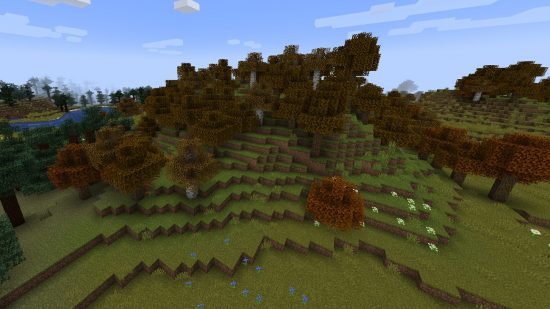
Serene Seasons
While you can get from winter to summer in Minecraft by traveling between a Snowy Taiga and a Desert biome, the Serene Seasons mod brings seasonal changes to biomes, including amended crop growth and weather patterns. Some biomes that aren’t usually snowy will see snowfall with Serene Seasons turned on, and you’ll see brown and orange leaves throughout autumn.

EnvironmentZ
The EnvironmentZ mod, like Thermite below, adds new, treacherous weathers, seasons, and environments. Not only are you challenged by the climate, but there are a range of new craftable items to help you deal with them, such as polar bear fur armor and heated stones.

Thermite
The Thermite mod is a pretty cool (or warm) mod that changes the temperature and other stats based on the biome you’re in. Okay, sorry, that was a bad pun, but don’t let it put you off this mod.
In vanilla Minecraft, you can freeze and take damage when stuck in deep powder snow blocks. Thermite essentially takes that idea and stretches it across the whole game: proximity to torches and campfires, for example, increase your temperature, while additional circumstances cool you off, such as rain and nighttime. Thermite even has dynamic wind, shown as particles moving around you, and wind even increases in strength the higher up you are. Essentially, think Minecraft but survival hardcore.
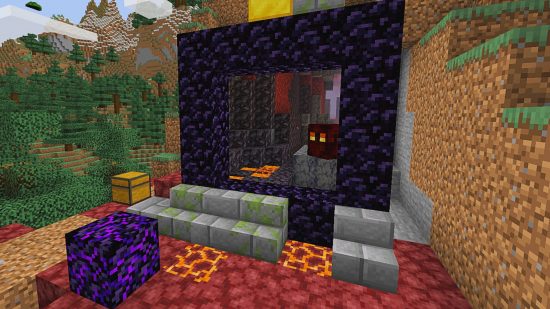
Immersive Portals
It can be pretty scary throwing yourself headfirst into a Minecraft Nether or end Portal without knowing what’s on the other side. Thankfully, Immersive Portals changes that by showing you precisely what awaits on the other side.
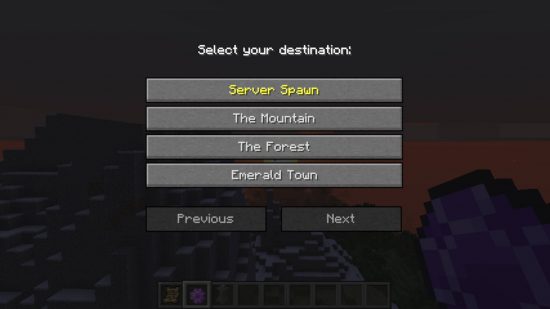
Waystones
With such a massive open world, getting back to where your home base can sometimes be a huge hassle. However, with the Waystones mod, you can craft Waystones in survival mode and place them to allow travel between them. You can also make Warp Scrolls or Warp Stones to teleport from anywhere. The mod also allows for random generation in the world of these items and global Waystones for Minecraft servers or Minecraft adventure maps.

Not Enough Animations
When it comes to playing in third-person, not a lot of love and care has been placed into making the animations truly shine. Created by tr7zw, the Not Enough Animations mod fixes this glaring issue by adding in some much-needed animations. Simple things like being able to watch your player model eat and drink, or even read maps, have been addressed. Our personal favorite fix is the change to boat rowing, making it so that the player in the boat isn’t sat there staring into the void.

Physics Mod
Physics mod is another great mod that can be smoothly implemented into a vanilla world without changing much, but the crumbling structure mechanic is a pretty darn cool addition to have. It also makes mining a easier. Break a few blocks and, depending on gravity and the surrounding blocks, the area comes crashing down. This won’t deal any damage to you – which is a bit disappointing, in a way – and doesn’t impact resource collection, you’ll still be able to walk through the rubble and pick up broken blocks.
This isn’t the only feature of Haubna’s Physics mod, though, as there’s also crumbling mods or ragdoll mods, whichever you prefer, and items no longer float about the ground as they fall to the floor in a more natural way.
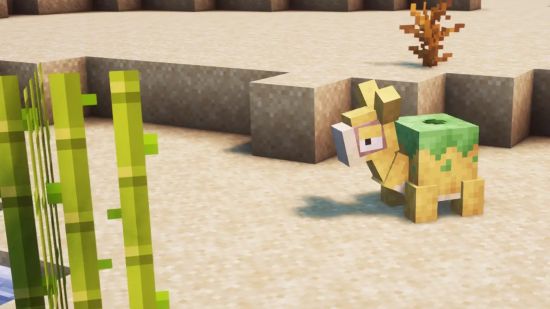
Cobblemon
We feel a bit mean putting this in here as the OG, Pixelmon, is further down the page. That said, the more recent Pokemon x Minecraft mod, Cobblemon, definitely deserves a place on this list as well, not least for it’s, ahem, arguably better aesthetic. Pixelmon ports modern Pokemon sprites into the game, meaning that, while your favorite Pokemon might be more familiar, they don’t quite match the Minecraft environment. Cobblemon, meanwhile, has crafted new models for each Pokemon using Minecraft’s pixelated style, so these cute critters look like more like actual Minecraft mobs.
The world itself is fairly similar to Pixelmon, with the usual Minecraft world generation only slightly altered by a few new textures, including apricorns growing on normal vanilla Minecraft trees. Really, the decision between which Pokemon Minecraft mod to use comes down to your preference of Pokemon model design. That said, you can also create your own custom Pokemon from scratch in Cobblemon, so if you’ve always had a dream Pokemon design in mind, you can now make it a reality.

Pixelmon
If there’s anything better than one of the most popular game franchises of all time, it’s two of the most popular game series of all time coming together. Pixelmon does just that, bringing all your favorite Pokemon to the world of Minecraft.
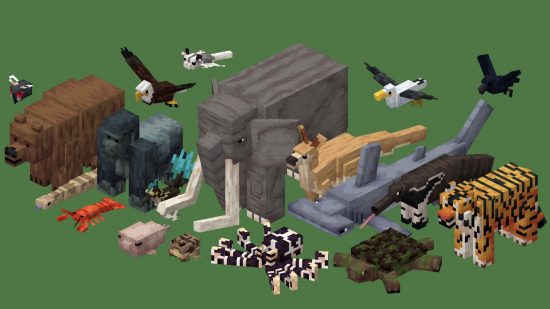
Alex’s Mobs
We know from the now-defunct Minecraft mob vote that players are always clamoring for additional animals, monsters, and humanoids to be added to vanilla Minecraft. Well, you don’t need to wait for the next big Minecraft update with Alex’s mobs’ 84 new animals. This mix of realistic and fictional creatures includes kangaroos, tigers, and a bone serpent – each has a unique mechanic and drops.

Spawn
Spawn is one of a few excellent Minecraft mods by Ninni, also the creator of Good Ending (higher up this list!). Another mod that adds a plethora of new mobs to Minecraft, Spawn has been growing since release, with creator Ninni constantly adding new mods and showcasing upcoming mods on their social channels, from snails, hamsters, seahorses, angler fish, and even ants.
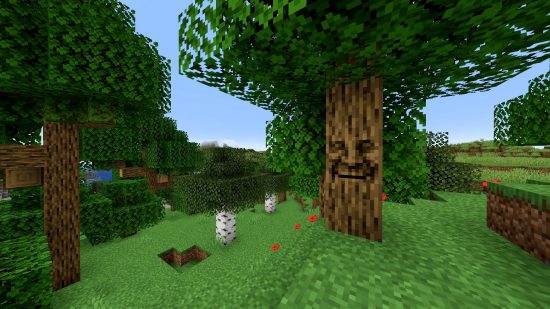
Mystical Oak Tree
While we’re at it, here’s another one from the maker of Supplementaries – Mystical Oak Tree. We couldn’t resist including this mini-mod, where you can interact with a wise old talking oak. Keep your eyes peeled for an oak tree with a face in any of the overworld biomes, and interact with the tree to hear jokes, facts, and more. Be careful not to talk to them during the day, as they don’t take it well to be woken from their sleep. Definitely don’t try to attack them – they’ll fight back.
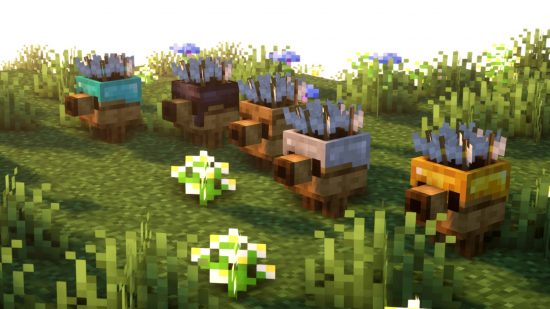
Max’s Miny Golems
If you’ve jumped into Minecraft Legends since its release, you might be familiar with the cute golems you can recruit to aid you in battle in the strategy game. Well, those mobs now appear in the original Minecraft, thanks to the Max’s Miny Golems mod.
While Max’s Miny Golems has some familiar faces from Legends, there are some differences. Firstly, there are more than the three base Legends golems here, as Max has added some of their own, with plans to add Beehive and Slime golems in the future. New items have been added as well to craft these cute companions, including new slabs, flowers, and grindstone variants.
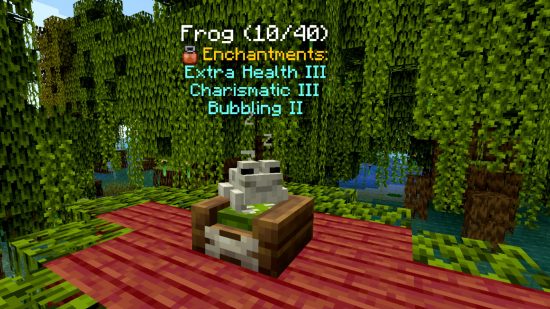
Domestication Innovation
From the same people who brought you Alex’s mobs, Domestication Innovation improves upon player interaction with mobs – both vanilla and modded. Enchant your pets, tame otherwise untameable mobs, use them in battle, and send them to sleep in their beds. The different enchantments can make your domesticated mobs do extraordinary things, like pull entities close, send enemies flying, and strike hostile mobs with lightning.
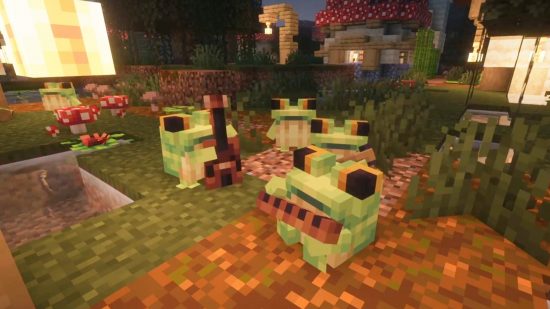
Ribbits
Unlike most of the mods on this page, Ribbits isn’t available for free on Modrinth or Nexus Mods, and requires a Patreon subscription for Bonsai Studios, so we weren’t sure whether to include it or not. However, we couldn’t resist, and we agree with modder Yung – mentioned above in Yung’s Better Fortresses – when they say this might be the cutest mod they’ve ever made.
Ribbits adds more frogs to swamp biomes. Simple. And sure, we’ve already got frogs in swamp biomes, why would we need more? Well, these adorable frogs form cute folk bands and play music. We don’t think any more needs saying, to be honest, but if you’re still not convinced, just watch this tweet for a video of them in action.
All the Mods 10
If you want a bit of everything from above, then this chunky mod pack is for you. The All the Mods team (ATM) has been creating mammoth mod packs for a while now, and ATM is a go-to, ready-made bundle if you want multiple mods but don’t want to put them together yourself. All the Mods 10 includes hundreds of mods, including some of those listed above. That said, it’s a pretty hefty download, so you might be unable to run All the Mods 10 on a lower-end PC.

Veinminer
Veinminer might be a mod you’ve seen content creators using, and it simply allows you to mine an entire vein in one go, which makes mining so much faster. Even better, Veinminer is vastly customizable, so you can make sure the settings suit your needs and give yourself the option to mine a single mine or a full vein depending on the situation.
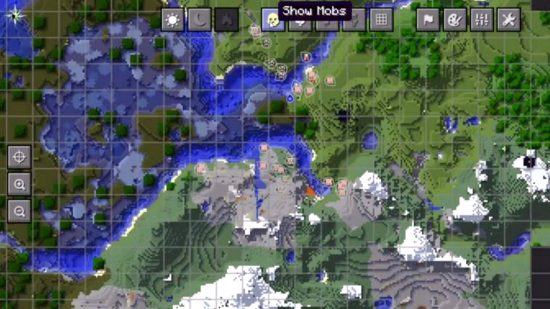
Xaero’s Minimap
Everyone likes to know where they’re going. Xaero’s Minimap maps your world as you explore, letting you mark waypoints of interest, and even warning you when Minecraft mobs sneak up behind you. The resultant minimap can be a unique rotating square or a classic circle, depending on your preferences, and while the minimap is kept as minimal as possible to avoid affecting performance, you can get even more features by adding Xaero’s World Map.
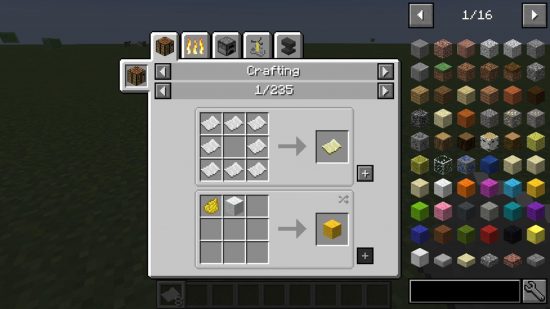
Just Enough Items
If you need an antidote to the pain of alt-tabbing to a wiki while playing Minecraft, then turn to Just Enough Items (or JEI). It lets you look up the recipe for any item from any installed Minecraft mod through a nifty interface on Minecraft’s inventory screen.
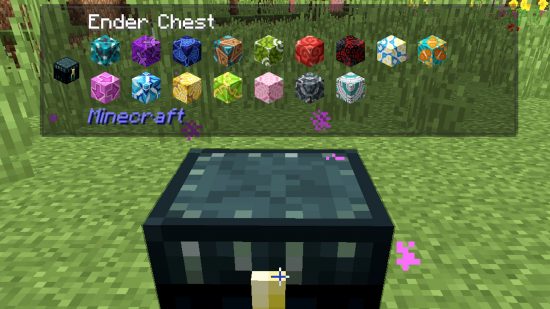
Jade
Jade is a super helpful Minecraft mod, particularly when you have a range of texture or world-changing mods installed alongside it. Not only does Jade tell you which item you are looking at, but it provides additional information, too, like the contents of a chest or any status effects applied to a mob.
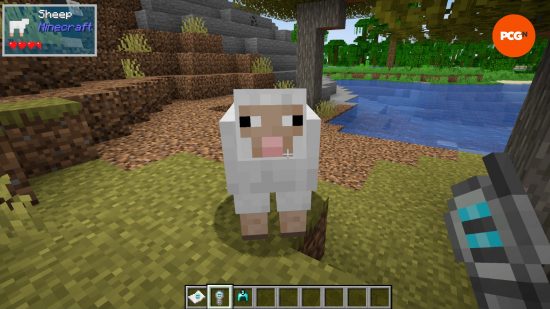
The One Probe
The One Probe, or TOP, is a more highly configurable version of Waila and Jade. The others have the UI available at all times, which you might like, but you may also find it a little intrusive. TOP, on the other hand, can be configured to only show what you’re looking at when you are holding the probe. This gives you more control over the appearance of the interface. What’s more, you can further customize just which information you want to see, including block break progress and mob health.
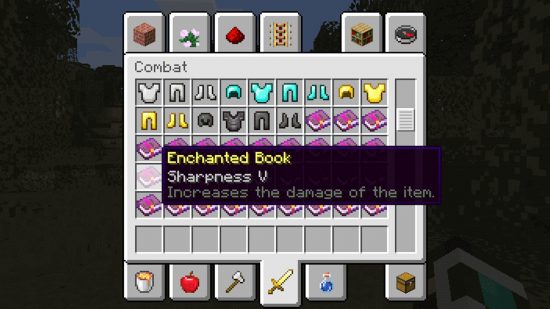
Enchantment Descriptions
For those who need a reminder of what the Minecraft enchantments do at a glance, the Enchantment Descriptions mod gives you the description of any enchanted book in your inventory. This mod also supports modded enchantments and will display these tooltips in over 13 languages.
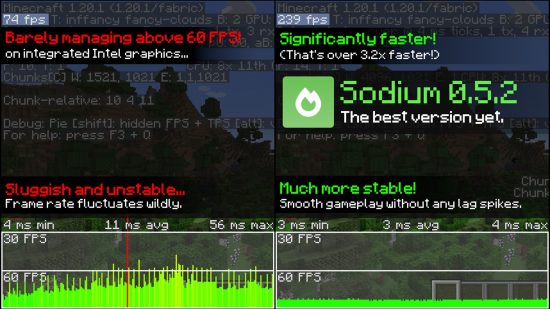
Sodium
Sodium is a simple rendering mod, and despite not doing anything to change the way the game looks, no fancy textures or lighting effects, it is perhaps one of the best and most important mods to consider. Sodium concentrates on improving your rendering speed, FPS, and performance stability without affecting the look of the game, so you can expect a more seamless gameplay experience – especially when making large mob farms, flying long distances, and the like.

Simple Voice Chat
Okay, this isn’t technically a performance mod, but it fits here better than any other section. And, you’ve probably guessed what it is already. The Simple Voice Chat mod is just that, a voice chat add-on for public or private servers to allow you to easily chat with friends. Presumably, “simple” refers to once it’s installed, as it does require some serious steps to set up, but it’s worth it. Once on, you can set up proximity chat, easily mute, record, and more, instantly improving the multiplayer Minecraft server experience.

Immersive Engineering
The whole point of Immersive Engineering is realism. Where other automation mods might have fantastical machines that make extraction and crafting simpler, Immersive Engineering has realistic, resource-intensive machines that look and feel better. That are just overall more satisfying to operate. Sure, you might have to actually dig ores out of the ground with the massive, multi-block excavator that in itself requires building from scratch, but think how good it’s going to feel when it’s chugging along. Don your ear defenders, throw up your Engineer’s Worktable, and get to work.

Industrialcraft
Industrialcraft is an old Minecraft mod that added automation and modern technology, similar to SkyFactory and other machinery-based mods. No longer available, Industrialcraft gives way to Ic2C, which can currently be played up to version 1.19.2.
The difference between Ic2C and, say, SkyFactory, is that it’s a simpler experience focused on just improving your base Minecraft experience rather than adding loads to it. Machines here improve the mechanics already in Minecraft: mine ores more efficiently, chop trees faster, craft better armor. That said, there are still a few essential new additions, such as solar power and electricity.
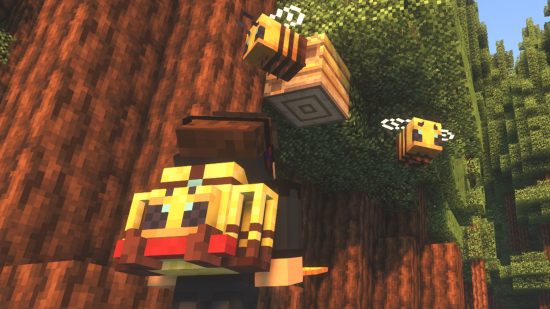
Traveler’s Backpacks
Mojang has now added bundles to the vanilla game, and, while the crafting recipe might be tough to complete, they’re an essential addition for adventuring and mining. However, that doesn’t mean Tiviacz’s cute Traveler’s Backpacks aren’t still worth playing with instead.
This adorable mod doesn’t only increase your storage capacity when you’re exploring the world, but it does so in style, giving you a choice of cute backpack to match your environment – just look at that Apiarist backpack above! If you want bundles with style, this is them.
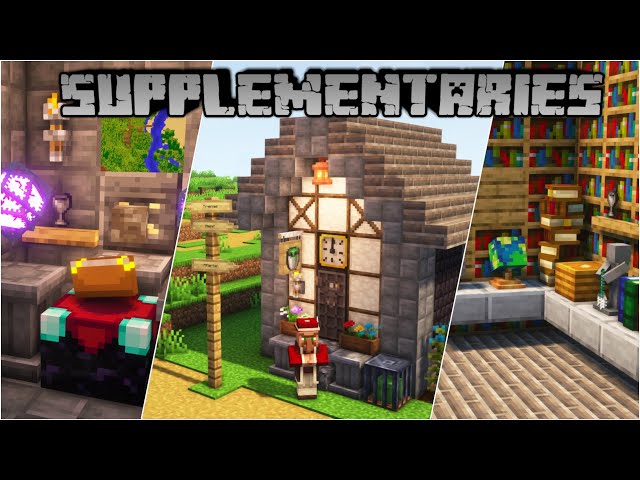
Supplementaries
The Supplementaries mod is an excellent complimentary mod to use alongside vanilla Minecraft and adds many new Redstone items, decorative blocks, and other tools and equipment. If you ever felt like you needed a pulley system or a weather vane that produces a Redstone signal, then Supplementaries has it. Want to lock something up with a key or proudly display your Netherite tools on a pedestal? It has that, too. To use Supplementaries, you must also install the Moonlight Library mod.
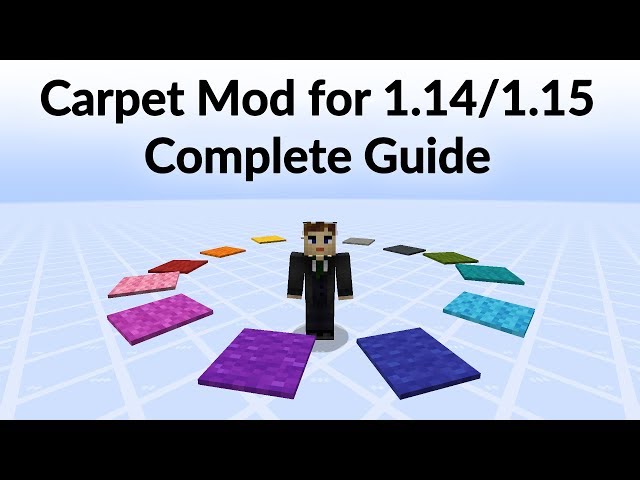
Carpet
Carpet is a complex peek behind the curtain of your vanilla world, and we wouldn’t recommend it to players new to the modding world. However, if you’re familiar with some of the more intricate aspects of the game, then you can use the Carpet mod to alter and mess with your own vanilla world, risk-free.
With Carpet installed, you automatically load into any of your existing Minecraft worlds, and nothing has changed. However, you can use Minecraft commands to meddle with things, including fixing bugs, changing mechanics, and utilizing creative tools. Carpet is fully customizable and compatible with vanilla Minecraft, so you can turn commands on and off at will, including all of them at any time, simply reverting to your vanilla world.
World Edit
If you follow any of the best Minecraft YouTubers, you most likely will have heard at least some mention of World Edit. Downloaded millions of times, World Edit gives players an easy way of building magnificent creations in Minecraft, with copy, paste, and move features and the ability to switch out one block type for another. Watch the video above from Hermitcraft YouTuber Grian to learn more about what you can do in World Edit if you’re just getting started.
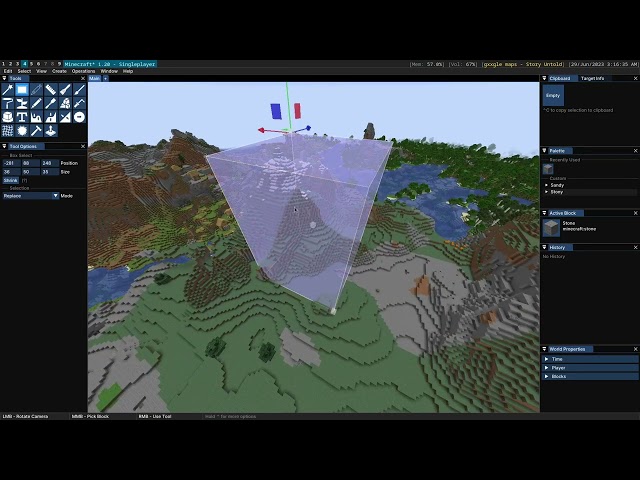
Axiom
The relatively new Axiom mod is an alternative to the classic World Edit, also featuring options to manipulate blocks, easily terraform large areas of ground in a few clicks, and life, move, and duplicate large builds.
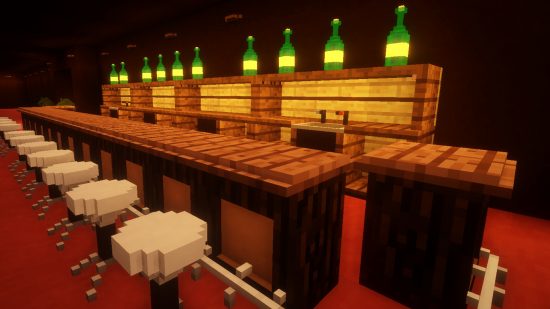
Little Tiles
To kick off the building mod section of this guide, we’re going right in at the deep end. While the limitations of Minecraft’s blocks may be part of the fun for many, LittleTiles allows those who want more flexibility to build with pixel-sized tiles. With LittleTiles, therefore, the only limitation is your imagination. This mod’s teeny blocks can even be used to make moveable parts, twinkling lights, and so much more.
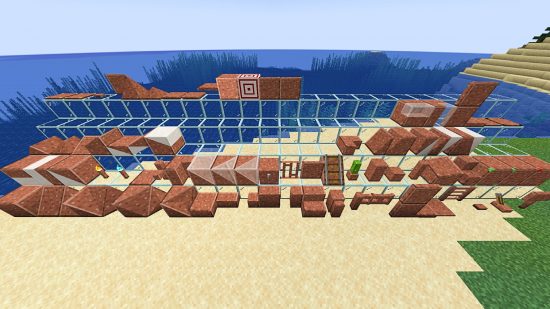
FramedBlocks
Cubes are great and all, but occasionally, you want a slope, right?FramedBlocks adds a ridiculous number of new shapes to the Minecraft inventory for you to work into your unique builds. Even better, though, is that they also have customizable textures. Simply right-click on your slope, slab, or step with any other Minecraft block, and it will take on that texture.
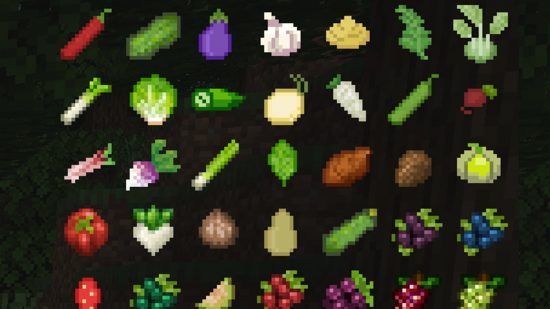
HarvestCraft
Not so much a mod for building but one that does introduce new items to the menu, Pam’s Harvestcraft 2 brings some serious variation to your Minecraft diet. A follow-up to the original Pam’s Harvestcraft – which can still be used in Minecraft versions up to 1.12 – PH2 is split into four separate mods: Food Core, Crops, Trees, and Food Extended. The result is a Minecraft diet that is lavish and balanced. If you want to make this a necessity rather than just a fun extension to vanilla Minecraft, use it alongside Hunger Overhaul and The Spice of Life, which both punish your poor eating habits.

Farmer’s Delight
As an alternative to Pam’s Harvestcraft, we also love Farmer’s Delight, another lovely Minecraft mod to add more food and recipes to your world. Farmer’s Delight also comes with advancements to guide you through all of its additions, so you can’t get lost or miss out on anything. To farm your new crops in the most effective way, this Minecraft mod also adds new soil types and tools, alongside all those tasty recipes.
How to install Minecraft mods
There are several ways to install Minecraft mods, depending on whether you want to install a management app or implement each mod individually. It might also depend on the mod itself, so check individual mod pages for specific instructions, for example, BetterEnd can only be installed via Fabric.
To install Minecraft mods using a mod manager:
- Download your chosen mod manager. We recommend Modrinth, Forge, Fabric, or Curseforge.
- Open your chosen launcher, and find and install mods within the app.
- Create separate profiles to load multiple mods at once.
- Load Minecraft through your mod manager.
The benefit to this option is that you can see all your downloaded mods in one place, and group them together into mod packs easily. It’s also much easier to run more than one mod at once through a manager.
To install Minecraft mods manually:
- Download your chosen mods using the links above.
- Unzip files, and move unzipped files into your Minecraft mods folder.
- Launch Minecraft.
- If you are unsure where to find your Minecraft folder, type %appdata% into your search bar, and find the folder named .minecraft.
Hopefully, with all those mods to choose from, you’re ready to get lost in Minecraft all over again. If you need a handy tool to manage your mods, our guide to installing and using Minecraft Forge will help you organize your modding needs and the best Minecraft seeds to pair them with. If that’s still not enough diversity from the vanilla game, check out our list of the best crafting games on PC.