
Close Menu
PixelArena.io
    What's Hot
    Hardwares

    Mojo Vision Secures $75M for Micro-LED Platform, AI Potential

    Xbox

    One Piece: Pirate Warriors 4 Switch 2, PS5, and DLC 7 Release Date Set

    Mobile

    Calliope Mori and Nerissa Ravencroft Song Used for Chaos Zero Nightmare

    Subscribe to Updates

    Get The Latest News, Updates, And Amazing Offers

    Important Pages:
    • Home
    • About Us
    • Contact us
    • Privacy Policy
    • Terms & Conditions
    Facebook X (Twitter) Instagram Pinterest
    Trending
    • But I believe Aang can save the FGC: We need simple fun, like Avatar Legends
    • Eva Longoria relished directing comedy The Fifth Wheel
    • Michael B. Jordan And Christian Bale Lead Reddit’s List Of Child Stars Who Became Great Adult Actors
    • How to Unlock All Characters in Super Meat Boy 3D
    • Crimson Desert: Why Critics Were Divided, The Review Scores, and How Patches Are Changing the Game
    • Resident Evil Creator Teasing Announcement with Stellar Blade Studio Shift Up
    • The first Elder Scrolls Online season is upon us, but I’m already more excited for the second
    • Palworld: More Than Just Pals Dating Sim Is Also a Horror Game
    • Home
    • About Us
    • Contact us
    • Privacy Policy
    • Terms & Conditions
    Facebook X (Twitter) Instagram Pinterest
    PixelArena.io
    • News

      How to Unlock All Characters in Super Meat Boy 3D

      March 31, 2026

      Beat the Beats Hits Quest, SteamVR, Pico 4 on April 2

      March 30, 2026

      Meta Slated to Launch Two New Ray-Ban Smart Glasses, According to FCC Filing

      March 29, 2026

      Legend of Ymir hitting Steam on 7th April

      March 28, 2026

      GameStop Didn’t Sell Its 4,710 Bitcoin

      March 27, 2026
    • New Release

      Crimson Desert: Why Critics Were Divided, The Review Scores, and How Patches Are Changing the Game

      March 31, 2026

      Dragon Ruins brings hardcore, old-school dungeoncrawling action to mobile as it opens pre-reg

      March 30, 2026

      Cover Reveal – Soulframe – Game Informer

      March 29, 2026

      The Empathy Test: Debugging Someone Else’s Mess Without Blaming Them

      March 28, 2026

      Devil May Cry 5 Devil Hunter Edition Rating Spotted Online

      March 27, 2026
    • Reviews

      Resident Evil Creator Teasing Announcement with Stellar Blade Studio Shift Up

      March 31, 2026

      Legendary Tales: Dawn of History Review

      March 30, 2026

      Review: Etrange Overlord’s Story Is Its Strongest Element 

      March 29, 2026

      Screamer Review – Too Many Layers

      March 28, 2026

      Intel Core Ultra 7 270K Plus and Intel Core Ultra 5 250K Plus review: another skippable CPU series

      March 27, 2026
    • PC

      Palworld: More Than Just Pals Dating Sim Is Also a Horror Game

      March 31, 2026

      My favorite Bluetooth speaker just got a gold-plated edition, and it’s not as expensive as you might think

      March 30, 2026

      A programmer with terminal brain cancer was caught in Epic’s mass layoff, but CEO Tim Sweeney says the studio ‘will solve the insurance for them’

      March 29, 2026

      Monster Hunter Stories 3 Free Update Adds Royal Monsters

      March 28, 2026

      This ultra rare Razer gaming mouse costs $1337, but is it any good?

      March 27, 2026
    • PlayStation

      PS5 Pro New PSSR Upscaler is now Accessible on Assassin’s Creed Shadows! – PixelArena.io

      March 31, 2026

      Mio Gets Silent Hill f Hinako Costume in Fatal Frame 2 Remake

      March 30, 2026

      New Price Changes for PS5, PS5 Pro, and PlayStation Portal remote player – PixelArena.io

      March 29, 2026

      Blue Reflection Quartet Game Compilation Announced

      March 28, 2026

      Official PlayStation Podcast Episode 537: Speaking Saros – PixelArena.io

      March 27, 2026
    • Xbox

      Wargaming Console and PC Titles to Get In-Game Benefits with Xbox Game Pass

      March 31, 2026

      Gachiakuta: The Game Gameplay Trailers Show Rudo and His Allies

      March 30, 2026

      New GigaBash DLC Adds New Maps, Original Characters, and Story Chapter

      March 29, 2026

      Resident Evil Requiem Photo Mode Patch Out Now

      March 28, 2026

      The Evil Clown Psychology: How Birthday Boy Bridges Generational Horror

      March 27, 2026
    • Nintendo

      Nintendo’s Biggest 2021 Anniversaries, The Game Awards | All Things Nintendo

      March 31, 2026

      Gundam Epyon Apex Legends Alter Version Color Scheme Pops

      March 30, 2026

      The Evolution And Future Of Mario Games | All Things Nintendo

      March 29, 2026

      Review: Ariana and the Elder Codex Can Be a Magical Metroidvania

      March 28, 2026

      The Best Of 2021 | All Things Nintendo

      March 27, 2026
    • Mobile

      FFVII High School AU Returns in Ever Crisis for April Fools’ Day 2026

      March 31, 2026

      Zenless Zone Zero S-Rank Billy Kid Alt Launches in 2.8

      March 30, 2026

      Krile Is a Dissidia Duellum Final Fantasy Standout

      March 29, 2026

      War of the Visions: Final Fantasy Brave Exvius Shutting Down

      March 28, 2026

      Genshin Impact Luna VI Adds Linnea and Temple of Space in April

      March 27, 2026
    • Hardwares

      LOOOK.AI Launches Real-Time AI Clothing Try-On Mirrors

      March 24, 2026

      Looking Glass Unveils musubi Holographic Photo and Video Frame

      March 11, 2026

      ŌURA Acquires Gesture Recognition Startup Doublepoint

      March 10, 2026

      RayNeo Unveils RayNeo Air 4 Pro AR Glasses with Batman Edition

      March 8, 2026

      Rokid Glasses Update Adds Native Support for Google Gemini AI

      March 6, 2026
    • Software

      How Superhuman Used Employee Advocacy to Manage a Rebrand

      March 2, 2026

      How Brands can Win Big at the Milan Winter Olympics

      January 14, 2026

      How to Leverage Valentine’s Day Marketing

      January 13, 2026

      How to Optimize Your Content

      December 9, 2025

      How to Run a Successful Hanukkah Creator Campaign | NeoReach

      November 26, 2025
    • Guides

      The first Elder Scrolls Online season is upon us, but I’m already more excited for the second

      March 31, 2026

      Today’s Wordle hint and answer for Monday, March 30

      March 30, 2026

      Anime Series That Rival Dragon Ball

      March 29, 2026

      As a court rules that social media platforms are harmful and addictive, new bans are considered, and VPN use is sure to rise

      March 28, 2026

      Crimson Desert: Best weapon types

      March 27, 2026
    • E-Sport

      But I believe Aang can save the FGC: We need simple fun, like Avatar Legends

      March 31, 2026

      “Increased focus on fandom”: Jake Sin on selecting the next VCT Pacific partner teams

      March 30, 2026

      “I dream of working in esports full-time again without being in a continuous state of crippling anxiety:” NLC is just one example of a huge issue in the esports industry

      March 27, 2026

      “If they stop doing yearly cycles and start thinking in terms of longevity, it could be interesting”: Former Call of Duty boss discusses esports limitations

      March 24, 2026

      Street Fighter 6 won’t be getting any gen AI content, marking the FGC safe from slop

      March 23, 2026
    • Entertainment

      Michael B. Jordan And Christian Bale Lead Reddit’s List Of Child Stars Who Became Great Adult Actors

      March 31, 2026

      Kid Rock Saluted an Apache by His Pool and Taunted Gavin Newsom. The Army Calls It Training

      March 30, 2026

      The Amazing Digital Circus: Release Date, Cast and Trailer

      March 29, 2026

      Maggie Gyllenhaal Reveals Warner Bros. Executive’s Bizarre Note On ‘The Bride’ And Test Screening Backlash

      March 28, 2026

      Engagement Rings Are Taking on New Meaning as Costs Rise

      March 27, 2026
    • Movies

      Eva Longoria relished directing comedy The Fifth Wheel

      March 31, 2026

      BenDavid Grabinski Breaks Down Ending

      March 30, 2026

      David Alan Grier reveals why he turned down Ace Ventura: Pet Detective

      March 29, 2026

      Most Iconic Movie & TV Sites

      March 28, 2026

      Josh Duhamel says actors shouldn’t discuss politics, but why?

      March 27, 2026
    • Featured

      The impossible alchemy of Lucid Blocks is a reminder that 99% of videogame crafting is boring

      March 31, 2026

      Review: Otome Daoshi Leans Into Anime and Manga Aesthetics

      March 30, 2026

      The Video Games You Should Play This Weekend – March 27

      March 29, 2026

      What are we all playing this weekend?

      March 28, 2026

      Review: Tales of Berseria Remastered Is More Like a Port

      March 27, 2026
    PixelArena.io
    Home»Xbox»Welcome to Your New ROG Xbox Ally: Essential Tips for Getting Started
    Xbox December 31, 2025

    Welcome to Your New ROG Xbox Ally: Essential Tips for Getting Started

    Facebook Twitter Pinterest WhatsApp Copy Link
    Welcome to Your New ROG Xbox Ally: Essential Tips for Getting Started
    Share
    Facebook Twitter Pinterest WhatsApp Copy Link

    It’s the holiday season, and perhaps you’re planning to give (or receive!) a ROG Xbox Ally or ROG Xbox Ally X. To help get you playing as quickly as possible, we’ve updated our guide to the best way to get started with your brand new handheld. 

    Congratulations on picking up your new ROG Xbox Ally or ROG Xbox Ally X! Whether you’re a handheld gaming veteran or just getting started, you’ve joined a growing and vibrant community of players who appreciate the flexibility of Windows and the power and ease of use of Xbox in the palm of your hands. While you probably picked up your Xbox Ally to dive right into your favorite games (we share some of our handheld favorites here), you’ll quickly discover that these handhelds offer tremendous flexibility to personalize your gaming experience. To help you hit the ground running, we’ve pulled together some must-know tips to make the most out of your new Xbox Ally.

    If you’re just setting your device up, check out the informative guide at Xbox Support for step-by-step instructions. Of note: Don’t skip the option to set up the fingerprint reader; unlocking your Xbox Ally with just a touch is fast and feels a little bit magical. Once setup is complete, you’ll boot up directly into the immersive Xbox full screen experience, a purpose-built gaming experience.

    Ready to go?  Here’s a few helpful pointers.

    Navigating your Xbox Ally

    Master the Menus: The Xbox Ally gives you multiple ways to find what you’re looking for— you can use the d-pad, joysticks, shoulder and face buttons to make selections, or simply tap the responsive touchscreen directly. For instance, to reach the all-important Game Bar settings menu, you can press the Xbox button and hit the right bumper, or simply swipe from the left edge of the screen toward the center. Swapping between apps? Long press the Xbox button or swipe up from the bottom to access the Task Switcher, making switching between apps and games seamless.

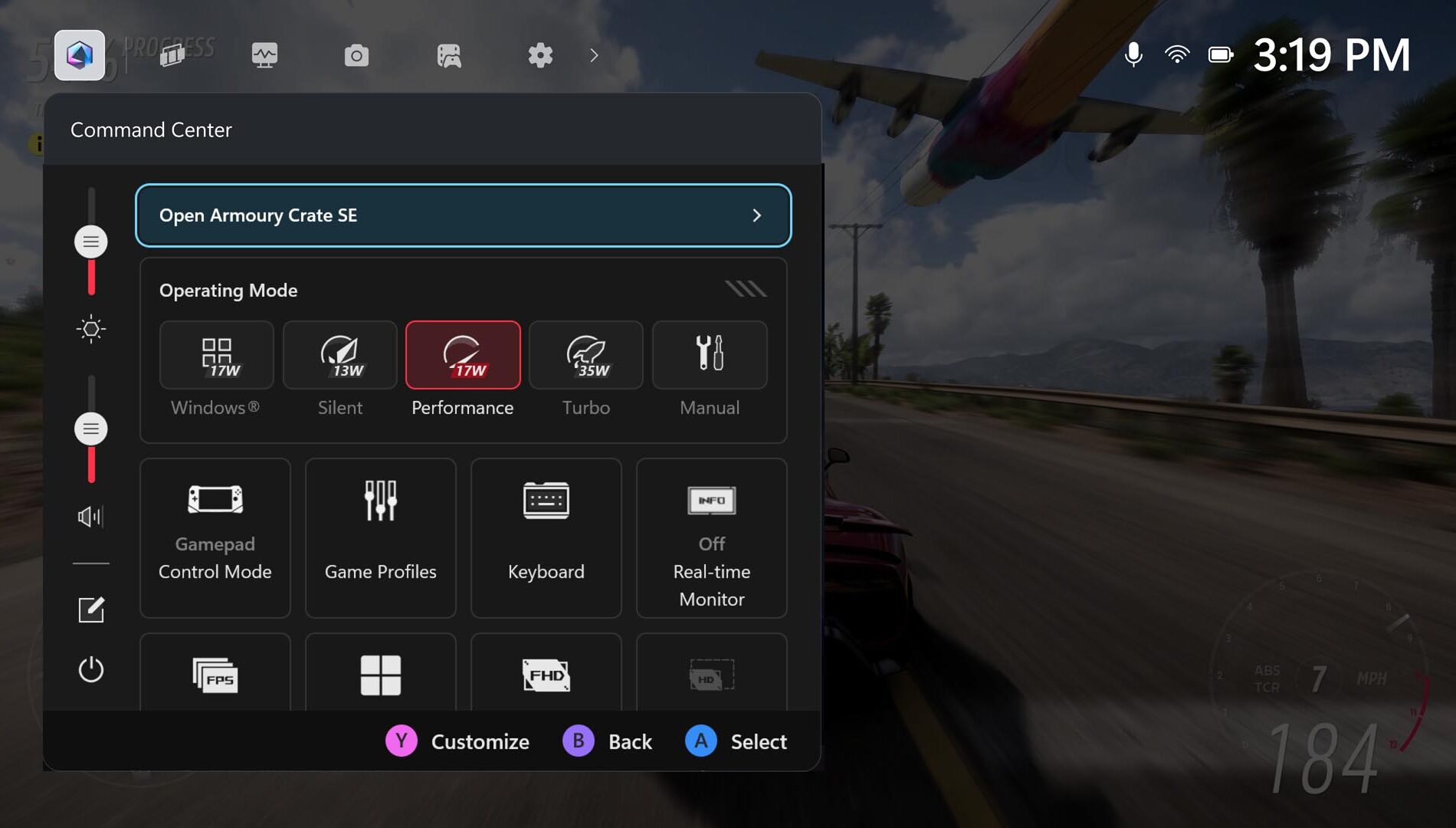
    Get Familiar with Command Center: ASUS Command Center is now integrated into Game Bar, giving you instant access to many advanced features to personalize your experience, both inside and outside of games.

    For a more expansive set of advanced settings and customization options, you can also launch the full-featured Armoury Crate SE right from this overlay.
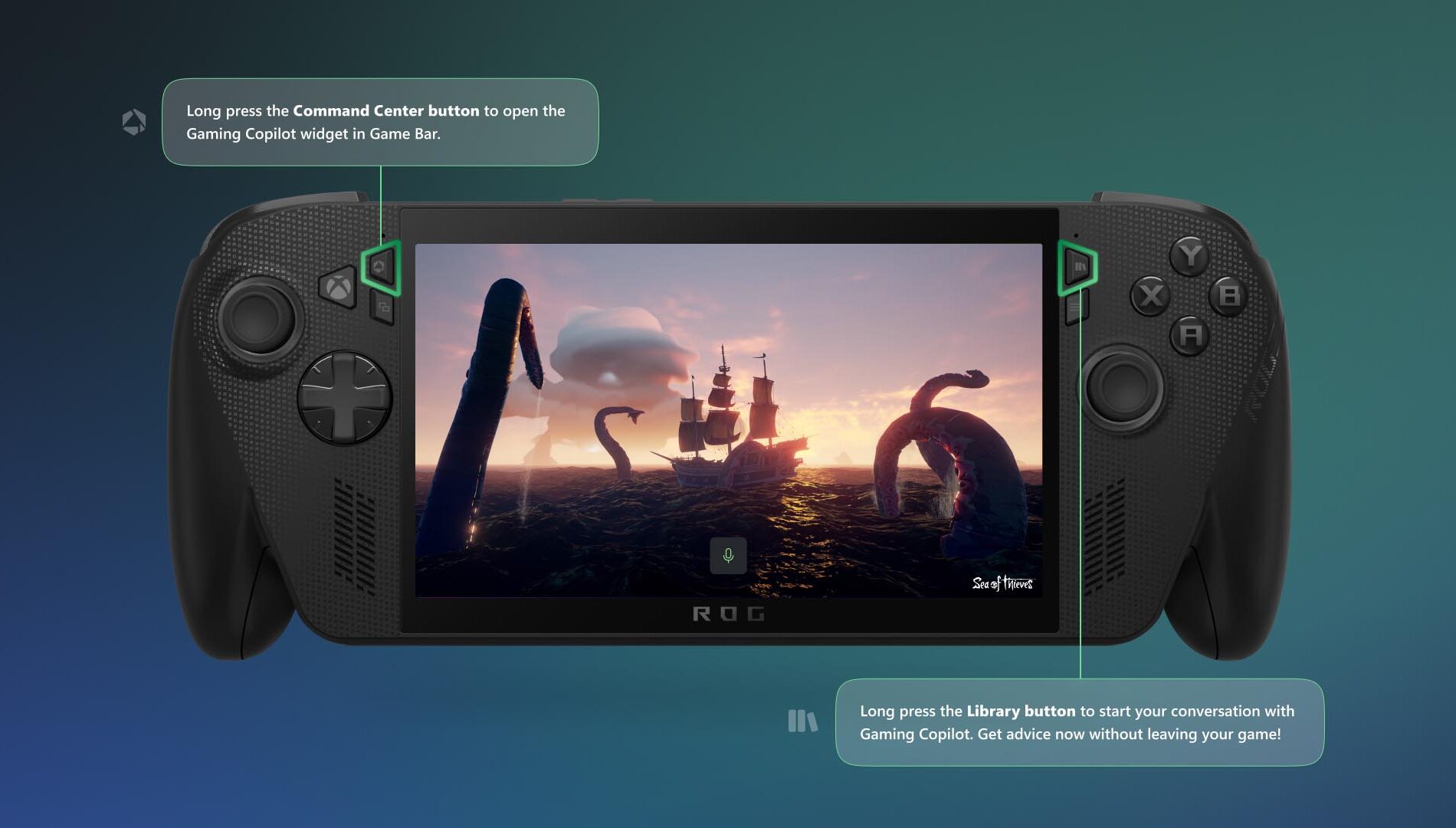
    Meet Gaming Copilot (Beta) — Your Personal Sidekick: You can access Gaming Copilot on the Xbox Ally, where it offers recommendations, tips, and insights when you need them. To get started, long press the Command Center button to open the Gaming Copilot widget in Game Bar, and complete the onboarding experience. After that, if you want to check your next achievement or get advice for a tough boss fight without leaving your game, long press the Library button and then release to start your conversation with Gaming Copilot.
    Play What You Want

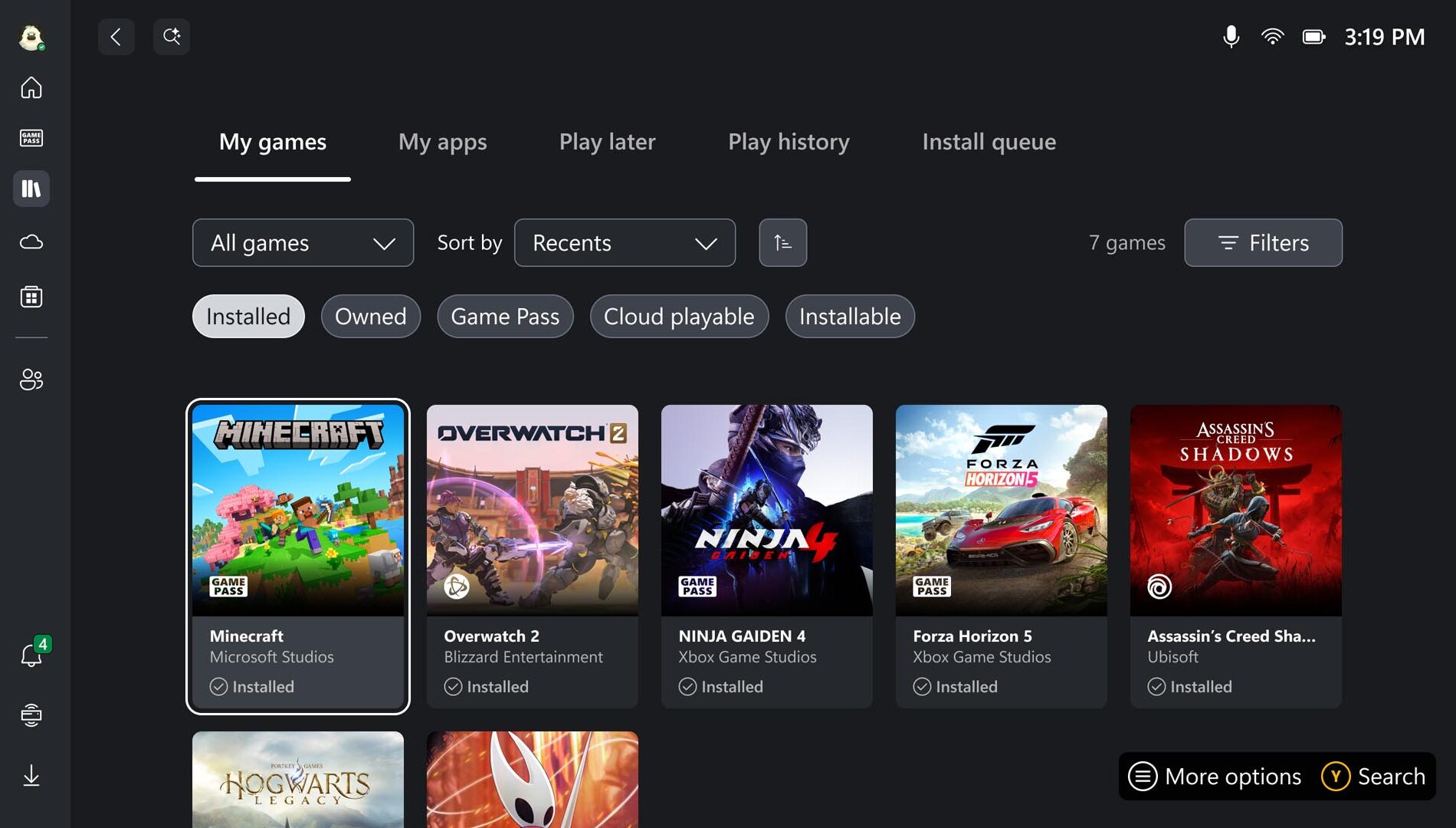
    Browse Your Games Library: Now it’s time to find some things to play! Head to the Library by pressing the dedicated Library button above the right thumbstick to find games you already own, as well as those available with Game Pass, and titles playable via the Xbox Cloud Gaming. Note: you can select more than one category at a time; highlighting Owned and Installable allows you to go shopping in your own closet for games that play natively on your Xbox Ally. Looking for something new? You’ll find the Store on the left rail as well.

    Access Your Games, From Leading PC Storefronts: With the aggregated gaming library, you can easily add your titles from leading PC storefronts to your library, to see all your games in one place. All you have to do is head to the My Apps tab in your Library, and select the PC storefront you want to install.
    If you don’t see your desired launcher, open Edge (also located in My apps), navigate to the store’s website, and download it.

    Play Anywhere—Including Offline: Handheld freedom means you’re bound to play in places without WiFi. While many titles work best online, most single-player games run great without a connection. Before you travel, test your games offline, pre-download any updates or DLC, and make sure you’re signed in. For detailed offline setup, see our guide: Play games in offline mode on Windows | Xbox Support. And if you’re flying, don’t forget to switch to airplane mode to save battery and avoid interruptions.

    Personalizing your Setup

    Play Your Way Using Accessibility Features: With the Xbox Ally and Xbox Ally X, the Xbox experience and Game Bar have been optimized for handheld use, bringing along familiar accessibility features from Xbox consoles and Windows 11 PCs. Most visual, cognitive, and sensory accessibility features can be found by selecting the Profile & Settings icon in the upper left of the screen, selecting Settings, then Accessibility. Input accessibility settings, including on-screen keyboard, input customizations, and the ability to re-map your Xbox Ally’s buttons are found in Armoury Crate SE.

    Connect External Controllers: Pair Xbox Wireless Controllers to your Xbox Ally just like you would with a PC. Turn on your controller, hold the Pair button, and look for the connect notification. Missed it? Open the Game Bar, navigate to Settings > Bluetooth > Manage devices, select Add device > Bluetooth, and follow the prompts.

    And don’t miss the clever detail: inside the underside of your Xbox Ally box lid, you’ll find a lightweight, sturdy paperboard stand—perfect for holding your Xbox Ally while charging or playing with an external controller without blocking the screen. This pairs well with the next feature:

    Docking for the Big Screen: The Xbox Ally–is your perfect gaming companion when you’re on the go, and when you’re at home it provides even more options to play. It’s easy to connect an external monitor or TV for a larger, even more immersive experience . Simply connect your Xbox Ally directly to a monitor or TV or to a dock via the USB-C port,. For optimal performance, it’s best to use “Second Screen Only” to match your TV’s resolution and refresh rate.

    Customize the Joystick Ring Lights: The Xbox Ally’s colorful lights surrounding the thumbsticks are one of its defining visual flourishes, but sometimes you may want to dim them for a red-eye flight or if you’re playing in dark room. To adjust them, open Armoury Crate SE and select Lighting to change how they pulse, or turn them off entirely.

    Stay up to date: The Xbox Ally you take out of the box is only the starting point. Last month, we shared updates to the ROG Xbox Ally handheld experience, including Default Game Profiles (Preview) which automatically balance frame rate (FPS) and power consumption for 40 supported games, Game Save Sync Indicators, which give you real-time confirmation that your progress is uploaded to the cloud, as well as other improvements to deliver a smoother, faster, and more reliable experience. Xbox and ASUS will continue to add new features and functionality to enhance your experience, which we’ll share over time. To ensure you’ve always got the latest updates, there are two places you’ll want to check from time to time. 

    Windows OS Update:

    • Open Game Bar > Settings Widget > More Settings > Open Windows Settings > Windows Update
    • Install all updates and restart your device when prompted

    Update Armoury Crate SE:

    • Open the Command Center
    • Select “Open Armoury Crate SE”
    • Select Update Center > Check for Updates > Update All

    We can’t wait to see where your new Xbox Ally or Xbox Ally X takes you. Whether you’re enjoying handheld gaming on the couch or setting high scores on the go, these tips will help you get the most out of every session.

    Share. Facebook Twitter Pinterest LinkedIn WhatsApp Copy Link
    Previous ArticleReview: Arcana Famiglia Rinato Is Such a Stylish Otome
    Next Article Siliconera’s Best Remake/Remaster of 2025

    Related Posts

    Wargaming Console and PC Titles to Get In-Game Benefits with Xbox Game Pass

    Gachiakuta: The Game Gameplay Trailers Show Rudo and His Allies

    New GigaBash DLC Adds New Maps, Original Characters, and Story Chapter

    Resident Evil Requiem Photo Mode Patch Out Now

    The Evil Clown Psychology: How Birthday Boy Bridges Generational Horror

    Silent Hill f Manga Will Run in Young Ace Up

    Black Ops 7 and Call of Duty: Warzone Season 03 Content Drop: The Full Details

    Persona Sound Station Will Share Persona 3 Soundtrack

    Add A Comment
    Leave A Reply Cancel Reply

    Follow Us
    • Facebook
    • Twitter
    • Pinterest
    • Instagram
    Top Picks
    Guides

    “It’s Time to Start Viewbotting” Twitch Manager Says Streamers Who Don’t Use Viewbots Are At a Disadvantage

    Guides March 4, 2026
    Nintendo

    Nintendo Switch Stays Dominant for Hardware & Software Sales in April

    Nintendo August 2, 2025
    Mobile

    FFVII Ever Crisis Dirge of Cerberus Chapter 2 Features Nero

    Mobile March 23, 2026
    Xbox

    Ride a Giant Cat Mount in FFXIV With Shagcoat Cat

    Xbox August 6, 2025
    Movies

    ‘Gabby’s Dollhouse: The Movie’ Ending: Sister Reveal Opens Franchise

    Movies September 30, 2025

    Subscribe to Updates

    Get The Latest News, Updates, And Amazing Offers

    Editors Picks
    Featured August 19, 2025

    Where Is Game Informer’s FBC: Firebreak Review?

    PlayStation June 19, 2025

    Climate Station launches today on PS5 and PS VR2 – PixelArena.io

    Movies February 3, 2026

    Russell Crowe’s ‘Nuremberg’ Hits French Cinemas, Igniting Oscar Snub Debate And Global Reactions

    Reviews December 14, 2025

    Tales of Xillia Remastered PS5 Review

    About Us
    About Us

    Your ultimate source for gaming news, delivering the latest updates, reviews, and insights from the gaming world. Stay informed, entertained, and ahead of the game with our comprehensive coverage of all things gaming.

    Facebook X (Twitter) Instagram Pinterest
    Our Picks
    PlayStation

    Cozy road trip adventure Outbound is coming To PS5 – PixelArena.io

    Nintendo

    Review: Videoverse Feels Meant for the Switch

    Featured

    Review: Hyrule Warriors: Age of Imprisonment

    Top Reviews
    E-Sport

    But I believe Aang can save the FGC: We need simple fun, like Avatar Legends

    Movies

    Eva Longoria relished directing comedy The Fifth Wheel

    Entertainment

    Michael B. Jordan And Christian Bale Lead Reddit’s List Of Child Stars Who Became Great Adult Actors

    © 2026 PixelArena.io.
    • Home
    • About Us
    • Contact us
    • Privacy Policy
    • Terms & Conditions

    Type above and press Enter to search. Press Esc to cancel.