
Close Menu
PixelArena.io
    What's Hot
    Reviews

    Iron Marines Invasion Review | Attack of the Fanboy

    Mobile

    4.1 Honkai: Star Rail Release Date and Characters Announced

    Movies

    Idris Elba Leaves the Armor at Home for Masters Movie Night

    Subscribe to Updates

    Get The Latest News, Updates, And Amazing Offers

    Important Pages:
    • Home
    • About Us
    • Contact us
    • Privacy Policy
    • Terms & Conditions
    Facebook X (Twitter) Instagram Pinterest
    Trending
    • Now is the winter of your discontent, console blaggards: the RPS team reflect on PlayStation going digital-only
    • Puppey returns as a coach, SumaiL hints at retirement, China’s chance at redemption: the best storylines going into The International 15
    • Inside the Making of a Box Office Bomb
    • Drake Teams Up With Crypto Platform Stake for ‘Janice Day 2026’
    • EVE Frontier’s Carbon game engine framework is now open source
    • Alien: Isolation 2 Preview – An Early But Unclear Look At The Changes Ahead
    • Rhythm Heaven Groove Review – Technique Is Solid
    • Reverse Chicken Race in Meccha Chameleon, Explained
    • Home
    • About Us
    • Contact us
    • Privacy Policy
    • Terms & Conditions
    Facebook X (Twitter) Instagram Pinterest
    PixelArena.io
    • News

      EVE Frontier’s Carbon game engine framework is now open source

      July 4, 2026

      US Senators Push to End CFTC ‘Assault’ on State Oversight of Prediction Markets

      July 3, 2026

      Why Low House Edge Casino Games Are Worth Your Time

      July 2, 2026

      ‘I do rage-bait them a bit’: Taylor Sheridan rips into TV critics, and vows to never return to Los Angeles unless ‘it secedes from the union’

      July 1, 2026

      Contexto 1381 Answer & Hints (June 30 2026)

      June 30, 2026
    • New Release

      Alien: Isolation 2 Preview – An Early But Unclear Look At The Changes Ahead

      July 4, 2026

      Sweepstakes Casinos vs. Traditional Online Casinos: Which One Is Right for You in 2026?

      July 3, 2026

      Blizzard’s Unannounced StarCraft Title: The Hard Facts

      July 2, 2026

      Cinder City Steam Page Goes Live as NC Unveils New Developer Preview

      July 1, 2026

      Cyberpunk 2077 is getting the VR mod fans have wanted for years

      June 29, 2026
    • Reviews

      Rhythm Heaven Groove Review – Technique Is Solid

      July 3, 2026

      Elden Ring Nightreign review | PixelArena.io

      July 2, 2026

      AVATAR LEGENDS: The Fighting Game Pre-orders Available Now

      July 1, 2026

      Another Developer Says ‘No’ To Making Baldur’s Gate 4

      June 30, 2026

      EA Sports UFC 6 Review – Complacency At The Top

      June 29, 2026
    • PC

      Portal 2 just got a Steam Frame compatibility rating, hinting at the VR headset’s imminent launch

      July 3, 2026

      The internet is agog at Captain America’s hog

      July 2, 2026

      AMD graphics cards likely to rise by 10%, according to new leak

      July 1, 2026

      Steam is getting a jockey simulator next month that reimagines umamusume as normal horses

      June 30, 2026

      RAM prices “will never be like last year again,” predicts PC maker Lenovo

      June 29, 2026
    • PlayStation

      June 2026’s top downloads – PixelArena.io

      July 3, 2026

      Awakening brings to PlayStation 5 Sept 22 – PixelArena.io

      July 2, 2026

      Modern Warfare III, For the King II, CrossCode – PixelArena.io

      July 1, 2026

      The Fighting Game Spirit Wilds stage revealed – PixelArena.io

      June 30, 2026

      PS5 Pro enhancements detailed – PixelArena.io

      June 29, 2026
    • Xbox

      Next Week on XBOX: New Games for July 6 to 10

      July 3, 2026

      Microsoft Flight Simulator Releases World Update 22: United States National Parks

      July 2, 2026

      Indie Selects for July 2026: Gameplay That Will Make Summer Pop

      July 1, 2026

      Hunt the Death Cult in Season of Death Awakening — Diablo IV — Blizzard News

      June 30, 2026

      MONOPOLY: Star Wars Heroes vs. Villains – Character Abilities Breakdown

      June 29, 2026
    • Nintendo

      Final Fantasy X 25th Anniversary Fan Art Project Starts

      June 19, 2026

      Vanillaware’s Muramasa: Rebirth Returns as Muramasa: Revenant Blades  

      June 18, 2026

      Final Fantasy Tactics Gets New Game+ and Zodiac Compatibility

      June 17, 2026

      Final Fantasy Resonance HD-2D JRPG Brings Back Brave Exvius

      June 16, 2026

      Dead by Daylight Getting Silent Hill’s Hinako, Bubble Head Nurse

      June 15, 2026
    • Mobile

      Identity V Neo Series Pop Up Store Heading to Book Off USA

      June 21, 2026

      New Cardcaptor Sakura Mobile Game Appears Next Week

      June 20, 2026

      Mead Based on Umamusume Tokai Teio Being Made

      June 19, 2026

      Genshin Impact Luna VIII Adds Sandrone and the Frost Moon

      June 18, 2026

      New Honkai: Star Rail Nendoroids Are Anaxa and Phainon

      June 17, 2026
    • Hardwares

      Unseen Reality Launches 93-Gram URXR One Mixed Reality Glasses

      June 26, 2026

      Meta and EssilorLuxottica Launch New Meta Glasses AI Eyewear Line

      June 25, 2026

      Qualcomm announces the Snapdragon Reality Elite XR chipset

      June 24, 2026

      Snap SPECS AR Glasses Unveiled at AWE 2026

      June 23, 2026

      Raven Resonance Previews Raven Prism Glasses at AWE USA 2026

      June 18, 2026
    • Software

      5 Ways To Measure The ROI Of Influencer Marketing

      June 3, 2026

      How to Protect Your Digital Assets

      June 2, 2026

      How to Use TikTok Templates to Spice Up Your Content

      June 1, 2026

      YouTube Shorts Monetization: How To Grow Your YouTube Channel with Shorts

      May 31, 2026

      How to Get Youtube Sponsorships for Small Channels and Creators

      May 30, 2026
    • Guides

      Reverse Chicken Race in Meccha Chameleon, Explained

      July 3, 2026

      Rust’s Common Ground update lets you set up clans, a shop, or kick back in your apartment

      July 2, 2026

      Your NYT Connections: Sports Edition Hints for Thursday July 2nd

      July 1, 2026

      New Fortnite DC Collab Leaked

      June 30, 2026

      The Lost Adventures codes (June 2026)

      June 29, 2026
    • E-Sport

      Puppey returns as a coach, SumaiL hints at retirement, China’s chance at redemption: the best storylines going into The International 15

      July 4, 2026

      One of the FGC’s biggest fears came true at Evo Vegas 2026: Ludwig’s comment shines light on grassroots, authenticity, and artificial hype

      July 3, 2026

      “We’ve seen people coming back”: Fatal Fury: City of the Wolves devs on pushing past previous setbacks, new content, and new players

      July 2, 2026

      Esports World Cup Paris: Team Vitality’s Nicolas Maurer on home advantage, Macron, and a “secret dream”

      July 1, 2026

      “Being together and doing hype stuff is important”: Invincible VS devs discuss locals, trash talk, and working with the FGC

      June 30, 2026
    • Entertainment

      Drake Teams Up With Crypto Platform Stake for ‘Janice Day 2026’

      July 4, 2026

      A Planning Nonprofit Secretary Found The Money Gone. Feds Say A Former Wyoming Planner Diverted Nearly $130K

      July 3, 2026

      Blue Eye Samurai Season 2: Release Date, Cast, Trailer, and More

      July 2, 2026

      Keke Palmer Built KeyTV Network So the Method Matters More Than the Person

      July 1, 2026

      A Winn-Dixie Worker Scanned Scratch-Offs With The Lottery App, Police Say. The Winnings Hit $39K

      June 30, 2026
    • Movies

      Inside the Making of a Box Office Bomb

      July 4, 2026

      Tom Holland’s The Odyssey Arrives in Theaters in Two Weeks

      July 3, 2026

      Hollywood star Zoey Deutch explains why she genre-hops

      July 2, 2026

      Monica Barbaro Joins Bradley Cooper, Robbie

      July 1, 2026

      Camila Mendes Steps Into Masters of the Universe as Sword-Slinging Teela

      June 30, 2026
    • Featured

      Now is the winter of your discontent, console blaggards: the RPS team reflect on PlayStation going digital-only

      July 4, 2026

      The Video Games You Should Play This Weekend – July 3, 2026

      July 3, 2026

      “You can literally reroute a river into a desert and cause it to bloom”: Star Wars Galaxies lead says of his new sandbox MMO Stars Reach

      July 2, 2026

      Tom Cruise And Julia Roberts Were Once Pitched As Master Chief And Cortana For Halo 2

      July 1, 2026

      Disassembling the Steam Machine suggests Valve are protecting its precious RAM by burying it under a dozen other parts

      June 30, 2026
    PixelArena.io
    Home»Xbox»Welcome to Your New ROG Xbox Ally: Essential Tips for Getting Started
    Xbox December 31, 2025

    Welcome to Your New ROG Xbox Ally: Essential Tips for Getting Started

    Facebook Twitter Pinterest WhatsApp Copy Link
    Welcome to Your New ROG Xbox Ally: Essential Tips for Getting Started
    Share
    Facebook Twitter Pinterest WhatsApp Copy Link

    It’s the holiday season, and perhaps you’re planning to give (or receive!) a ROG Xbox Ally or ROG Xbox Ally X. To help get you playing as quickly as possible, we’ve updated our guide to the best way to get started with your brand new handheld. 

    Congratulations on picking up your new ROG Xbox Ally or ROG Xbox Ally X! Whether you’re a handheld gaming veteran or just getting started, you’ve joined a growing and vibrant community of players who appreciate the flexibility of Windows and the power and ease of use of Xbox in the palm of your hands. While you probably picked up your Xbox Ally to dive right into your favorite games (we share some of our handheld favorites here), you’ll quickly discover that these handhelds offer tremendous flexibility to personalize your gaming experience. To help you hit the ground running, we’ve pulled together some must-know tips to make the most out of your new Xbox Ally.

    If you’re just setting your device up, check out the informative guide at Xbox Support for step-by-step instructions. Of note: Don’t skip the option to set up the fingerprint reader; unlocking your Xbox Ally with just a touch is fast and feels a little bit magical. Once setup is complete, you’ll boot up directly into the immersive Xbox full screen experience, a purpose-built gaming experience.

    Ready to go?  Here’s a few helpful pointers.

    Navigating your Xbox Ally

    Master the Menus: The Xbox Ally gives you multiple ways to find what you’re looking for— you can use the d-pad, joysticks, shoulder and face buttons to make selections, or simply tap the responsive touchscreen directly. For instance, to reach the all-important Game Bar settings menu, you can press the Xbox button and hit the right bumper, or simply swipe from the left edge of the screen toward the center. Swapping between apps? Long press the Xbox button or swipe up from the bottom to access the Task Switcher, making switching between apps and games seamless.

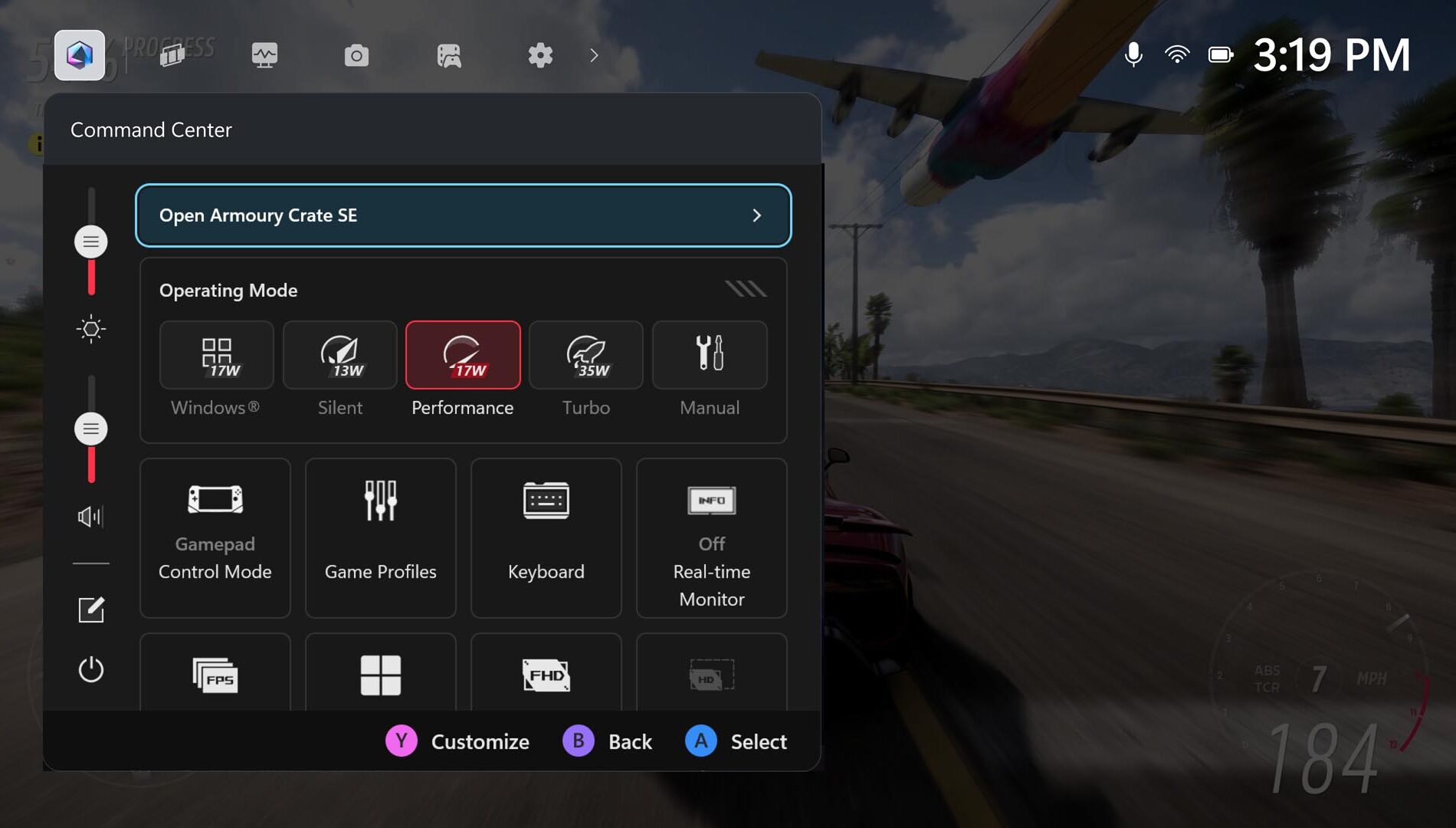
    Get Familiar with Command Center: ASUS Command Center is now integrated into Game Bar, giving you instant access to many advanced features to personalize your experience, both inside and outside of games.

    For a more expansive set of advanced settings and customization options, you can also launch the full-featured Armoury Crate SE right from this overlay.
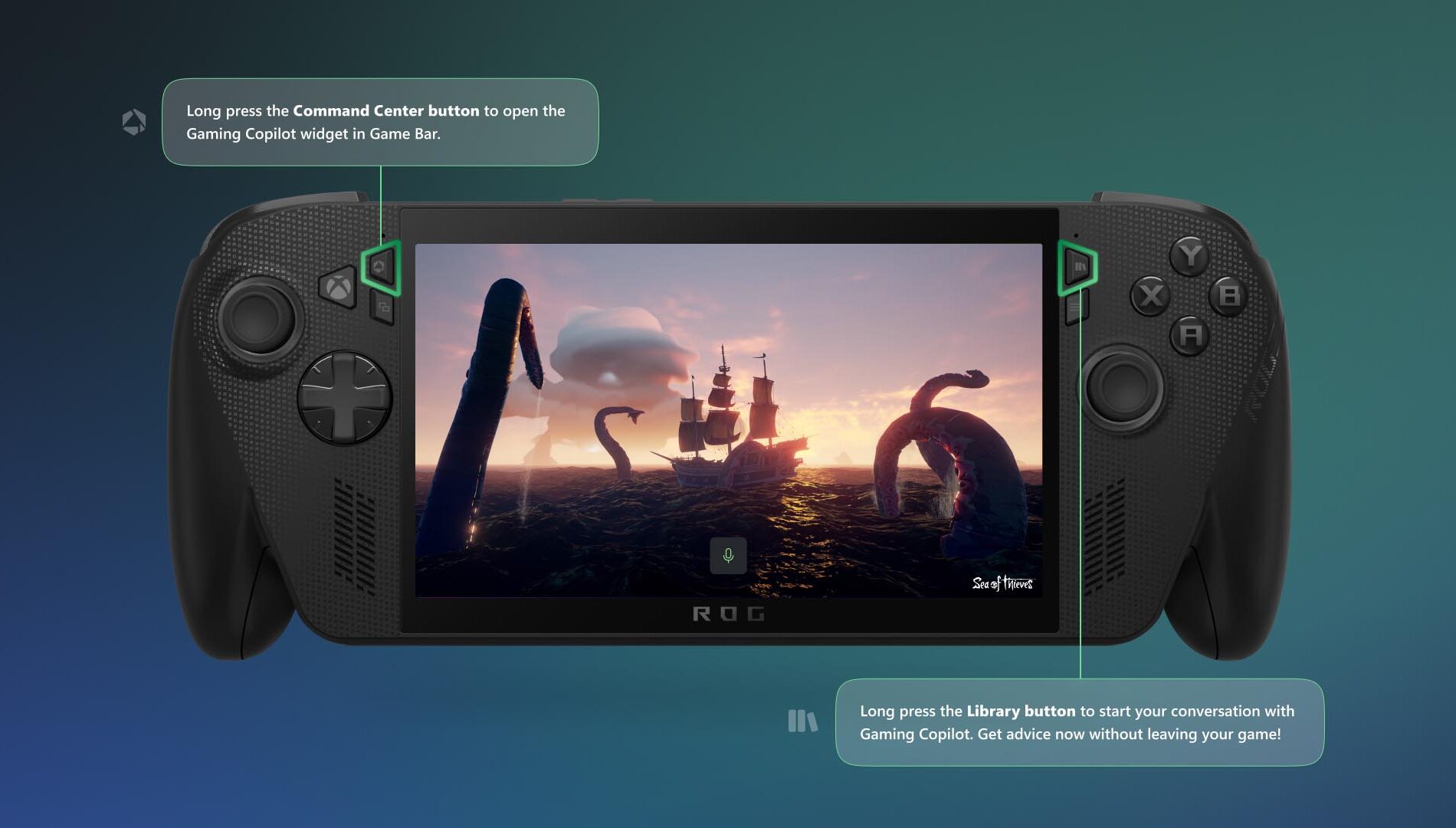
    Meet Gaming Copilot (Beta) — Your Personal Sidekick: You can access Gaming Copilot on the Xbox Ally, where it offers recommendations, tips, and insights when you need them. To get started, long press the Command Center button to open the Gaming Copilot widget in Game Bar, and complete the onboarding experience. After that, if you want to check your next achievement or get advice for a tough boss fight without leaving your game, long press the Library button and then release to start your conversation with Gaming Copilot.
    Play What You Want

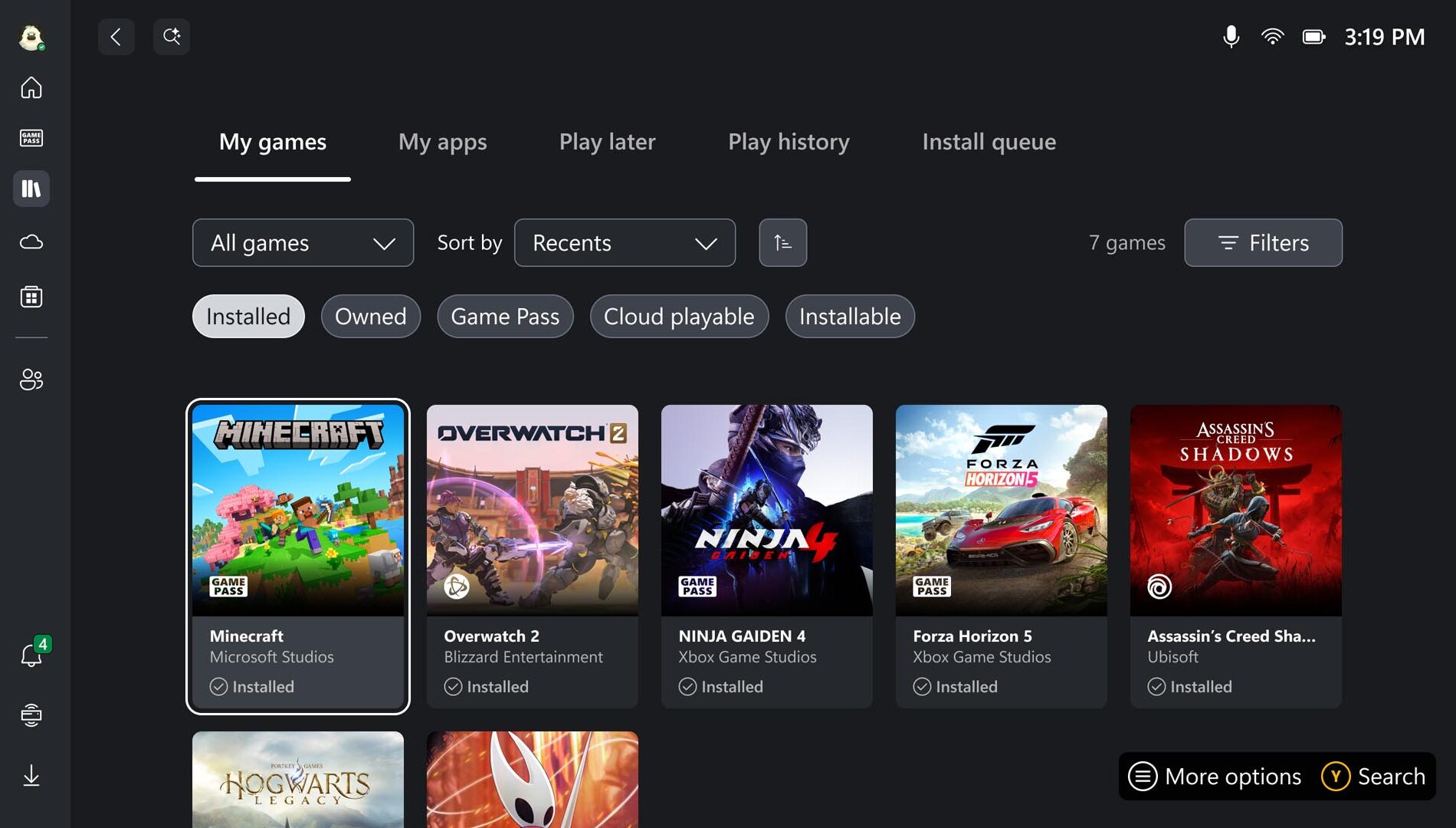
    Browse Your Games Library: Now it’s time to find some things to play! Head to the Library by pressing the dedicated Library button above the right thumbstick to find games you already own, as well as those available with Game Pass, and titles playable via the Xbox Cloud Gaming. Note: you can select more than one category at a time; highlighting Owned and Installable allows you to go shopping in your own closet for games that play natively on your Xbox Ally. Looking for something new? You’ll find the Store on the left rail as well.

    Access Your Games, From Leading PC Storefronts: With the aggregated gaming library, you can easily add your titles from leading PC storefronts to your library, to see all your games in one place. All you have to do is head to the My Apps tab in your Library, and select the PC storefront you want to install.
    If you don’t see your desired launcher, open Edge (also located in My apps), navigate to the store’s website, and download it.

    Play Anywhere—Including Offline: Handheld freedom means you’re bound to play in places without WiFi. While many titles work best online, most single-player games run great without a connection. Before you travel, test your games offline, pre-download any updates or DLC, and make sure you’re signed in. For detailed offline setup, see our guide: Play games in offline mode on Windows | Xbox Support. And if you’re flying, don’t forget to switch to airplane mode to save battery and avoid interruptions.

    Personalizing your Setup

    Play Your Way Using Accessibility Features: With the Xbox Ally and Xbox Ally X, the Xbox experience and Game Bar have been optimized for handheld use, bringing along familiar accessibility features from Xbox consoles and Windows 11 PCs. Most visual, cognitive, and sensory accessibility features can be found by selecting the Profile & Settings icon in the upper left of the screen, selecting Settings, then Accessibility. Input accessibility settings, including on-screen keyboard, input customizations, and the ability to re-map your Xbox Ally’s buttons are found in Armoury Crate SE.

    Connect External Controllers: Pair Xbox Wireless Controllers to your Xbox Ally just like you would with a PC. Turn on your controller, hold the Pair button, and look for the connect notification. Missed it? Open the Game Bar, navigate to Settings > Bluetooth > Manage devices, select Add device > Bluetooth, and follow the prompts.

    And don’t miss the clever detail: inside the underside of your Xbox Ally box lid, you’ll find a lightweight, sturdy paperboard stand—perfect for holding your Xbox Ally while charging or playing with an external controller without blocking the screen. This pairs well with the next feature:

    Docking for the Big Screen: The Xbox Ally–is your perfect gaming companion when you’re on the go, and when you’re at home it provides even more options to play. It’s easy to connect an external monitor or TV for a larger, even more immersive experience . Simply connect your Xbox Ally directly to a monitor or TV or to a dock via the USB-C port,. For optimal performance, it’s best to use “Second Screen Only” to match your TV’s resolution and refresh rate.

    Customize the Joystick Ring Lights: The Xbox Ally’s colorful lights surrounding the thumbsticks are one of its defining visual flourishes, but sometimes you may want to dim them for a red-eye flight or if you’re playing in dark room. To adjust them, open Armoury Crate SE and select Lighting to change how they pulse, or turn them off entirely.

    Stay up to date: The Xbox Ally you take out of the box is only the starting point. Last month, we shared updates to the ROG Xbox Ally handheld experience, including Default Game Profiles (Preview) which automatically balance frame rate (FPS) and power consumption for 40 supported games, Game Save Sync Indicators, which give you real-time confirmation that your progress is uploaded to the cloud, as well as other improvements to deliver a smoother, faster, and more reliable experience. Xbox and ASUS will continue to add new features and functionality to enhance your experience, which we’ll share over time. To ensure you’ve always got the latest updates, there are two places you’ll want to check from time to time. 

    Windows OS Update:

    • Open Game Bar > Settings Widget > More Settings > Open Windows Settings > Windows Update
    • Install all updates and restart your device when prompted

    Update Armoury Crate SE:

    • Open the Command Center
    • Select “Open Armoury Crate SE”
    • Select Update Center > Check for Updates > Update All

    We can’t wait to see where your new Xbox Ally or Xbox Ally X takes you. Whether you’re enjoying handheld gaming on the couch or setting high scores on the go, these tips will help you get the most out of every session.

    Share. Facebook Twitter Pinterest LinkedIn WhatsApp Copy Link
    Previous ArticleReview: Arcana Famiglia Rinato Is Such a Stylish Otome
    Next Article Siliconera’s Best Remake/Remaster of 2025

    Related Posts

    Next Week on XBOX: New Games for July 6 to 10

    Microsoft Flight Simulator Releases World Update 22: United States National Parks

    Indie Selects for July 2026: Gameplay That Will Make Summer Pop

    Hunt the Death Cult in Season of Death Awakening — Diablo IV — Blizzard News

    MONOPOLY: Star Wars Heroes vs. Villains – Character Abilities Breakdown

    How Star Wars: Galactic Racer Turns Podracing into a Challenging Roguelite

    The Story Behind Mousebusters’ Pixel-Art Ghost Hunting, Out Now on XBOX

    Next Week on XBOX: New Games for June 29 to July 3

    Add A Comment
    Leave A Reply Cancel Reply

    Follow Us
    • Facebook
    • Twitter
    • Pinterest
    • Instagram
    Top Picks
    New Release

    Why Simplicity Still Wins in Digital Product Design

    New Release February 16, 2026
    Nintendo

    The eShop Gems Of The Year: 2021 Edition | All Things Nintendo

    Nintendo April 2, 2026
    Guides

    NYT Connections hints and answers for today, Thursday Jan 22

    Guides January 22, 2026
    E-Sport

    Fortnite September Update – Full Patch Notes and What’s New This Month

    E-Sport September 15, 2025
    E-Sport

    The Smash scene needs Super Smash Bros. 6 to come out ASAP

    E-Sport June 10, 2026

    Subscribe to Updates

    Get The Latest News, Updates, And Amazing Offers

    Editors Picks
    PlayStation July 17, 2025

    FFXIV European Automatic Housing Demolition Resumes in 7.3

    Entertainment June 27, 2025

    America’s Workers Are Bracing for Impact And Losing Faith in Employers

    Xbox April 13, 2026

    Reach Heroic Heights in Reign of Talon – Season 2: Summit – News

    E-Sport April 6, 2026

    “We’re not expected to make it”: Cloud9 Coach Immi is not concerned being the only NA VCT team to never make internationals

    About Us
    About Us

    Your ultimate source for gaming news, delivering the latest updates, reviews, and insights from the gaming world. Stay informed, entertained, and ahead of the game with our comprehensive coverage of all things gaming.

    Facebook X (Twitter) Instagram Pinterest
    Our Picks
    PC

    Siliconera’s Most Anticipated Games of 2026

    Nintendo

    Next Overwatch 2 Video Game Crossover Is Persona 5

    Xbox

    Everything You Need to Know About The Hatch, Roblox’s Biggest Egg Hunt Yet

    Top Reviews
    Featured

    Now is the winter of your discontent, console blaggards: the RPS team reflect on PlayStation going digital-only

    E-Sport

    Puppey returns as a coach, SumaiL hints at retirement, China’s chance at redemption: the best storylines going into The International 15

    Movies

    Inside the Making of a Box Office Bomb

    © 2026 PixelArena.io.
    • Home
    • About Us
    • Contact us
    • Privacy Policy
    • Terms & Conditions

    Type above and press Enter to search. Press Esc to cancel.